Docker容器互访三种方式

方式一、虚拟ip访问

安装docker时,docker会默认创建一个内部的桥接网络docker0,每创建一个容器分配一个虚拟网卡,容器之间可以根据ip互相访问。

1
2
3
4
5
6
7
8
9
10
11
# ifconfig
---
docker0: flags=4163<UP,BROADCAST,RUNNING,MULTICAST> mtu 1500
inet 172.17.0.1 netmask 255.255.0.0 broadcast 0.0.0.0
inet6 fe80::42:35ff:feac:66d8 prefixlen 64 scopeid 0x20<link>
ether 02:42:35:ac:66:d8 txqueuelen 0 (Ethernet)
RX packets 4018 bytes 266467 (260.2 KiB)
RX errors 0 dropped 0 overruns 0 frame 0
TX packets 4226 bytes 33935667 (32.3 MiB)
TX errors 0 dropped 0 overruns 0 carrier 0 collisions 0
---

运行一个centos镜像, 查看ip地址得到:172.17.0.7

1
2
3
4
5
6
7
8
9
10
11
12
13
# docker run -it --name centos-1 docker.io/centos:latest
# ifconfig

---
eth0: flags=4163<UP,BROADCAST,RUNNING,MULTICAST> mtu 1500
inet 172.17.0.7 netmask 255.255.0.0 broadcast 0.0.0.0
inet6 fe80::42:acff:fe11:7 prefixlen 64 scopeid 0x20<link>
ether 02:42:ac:11:00:07 txqueuelen 0 (Ethernet)
RX packets 16 bytes 1296 (1.2 KiB)
RX errors 0 dropped 0 overruns 0 frame 0
TX packets 8 bytes 648 (648.0 B)
TX errors 0 dropped 0 overruns 0 carrier 0 collisions 0
---

以同样的命令再起一个容器,查看ip地址得到:172.17.0.8

1
2
3
4
5
6
7
8
9
10
11
12
13
# docker run -it --name centos-2 docker.io/centos:latest
# ifconfig

---
eth0: flags=4163<UP,BROADCAST,RUNNING,MULTICAST> mtu 1500
inet 172.17.0.8 netmask 255.255.0.0 broadcast 0.0.0.0
inet6 fe80::42:acff:fe11:8 prefixlen 64 scopeid 0x20<link>
ether 02:42:ac:11:00:08 txqueuelen 0 (Ethernet)
RX packets 8 bytes 648 (648.0 B)
RX errors 0 dropped 0 overruns 0 frame 0
TX packets 8 bytes 648 (648.0 B)
TX errors 0 dropped 0 overruns 0 carrier 0 collisions 0
---

容器内部ping测试结果如下:

1
2
3
4
5
6
7
8
9
# ping 172.17.0.7

---
PING 172.17.0.7 (172.17.0.7) 56(84) bytes of data.
64 bytes from 172.17.0.7: icmp_seq=1 ttl=64 time=0.205 ms
64 bytes from 172.17.0.7: icmp_seq=2 ttl=64 time=0.119 ms
64 bytes from 172.17.0.7: icmp_seq=3 ttl=64 time=0.118 ms
64 bytes from 172.17.0.7: icmp_seq=4 ttl=64 time=0.101 ms
---

这种方式必须知道每个容器的ip,在实际使用中并不实用。

运行容器的时候加上参数link

运行第一个容器

1
docker run -it --name centos-1 docker.io/centos:latest

运行第二个容器

1
2
3
docker run -it --name centos-2 \ 
--link centos-1:centos-1 \
docker.io/centos:latest

--link:参数中第一个centos-1是 容器名 ,第二个centos-1是定义的 容器别名 (使用别名访问容器),为了方便使用,一般别名默认容器名。

测试结果如下:

1
2
3
4
5
6
7
8
9
# ping centos-1

---
PING centos-1 (172.17.0.7) 56(84) bytes of data.
64 bytes from centos-1 (172.17.0.7): icmp_seq=1 ttl=64 time=0.210 ms
64 bytes from centos-1 (172.17.0.7): icmp_seq=2 ttl=64 time=0.116 ms
64 bytes from centos-1 (172.17.0.7): icmp_seq=3 ttl=64 time=0.112 ms
64 bytes from centos-1 (172.17.0.7): icmp_seq=4 ttl=64 time=0.114 ms
---

此方法对容器创建的顺序有要求,如果集群内部多个容器要互访,使用就不太方便。

方式三、创建bridge网络

  1. 安装好docker后,运行如下命令创建bridge网络:
1
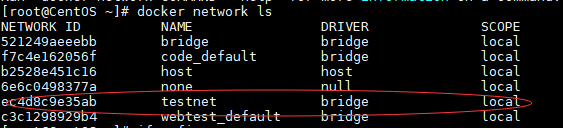
docker network create testnet

查询到新创建的bridge testnet。

  1. 运行容器连接到testnet网络。
    使用方法:
    1
    2
    3
    docker run -it --name <容器名> \
    --network <bridge> \
    --network-alias <网络别名> <镜像名>
1
2
3
4
docker run -it --name centos-1 --network testnet \
--network-alias centos-1 docker.io/centos:latest
docker run -it --name centos-2 --network testnet \
--network-alias centos-2 docker.io/centos:latest
  1. 从一个容器ping另外一个容器,测试结果如下:
1
2
3
4
5
6
7
8
9
# ping centos-1

---
PING centos-1 (172.20.0.2) 56(84) bytes of data.
64 bytes from centos-1.testnet (172.20.0.2): icmp_seq=1 ttl=64 time=0.158 ms
64 bytes from centos-1.testnet (172.20.0.2): icmp_seq=2 ttl=64 time=0.108 ms
64 bytes from centos-1.testnet (172.20.0.2): icmp_seq=3 ttl=64 time=0.112 ms
64 bytes from centos-1.testnet (172.20.0.2): icmp_seq=4 ttl=64 time=0.113 ms
---
  1. 若访问容器中服务,可以使用这用方式访问 <网络别名>:<服务端口号>

推荐使用这种方法,自定义网络,因为使用的是网络别名,可以不用顾虑ip是否变动,只要连接到docker内部bright网络即可互访。bridge也可以建立多个,隔离在不同的网段。