Chemmy's Blog

chengming0916@outlook.com

本文深入探讨了使用随机GUID作为数据库主键的性能瓶颈,并详细介绍了有序GUID(Sequential GUID / COMB GUID)的解决方案。通过将时间戳嵌入GUID的特定位置,使其在插入时保持大致递增的顺序,从而在多种数据库(SQL Server, MySQL, Oracle, PostgreSQL)中获得接近整型自增主键的插入性能。

一、 问题背景:为什么随机GUID性能差?

1.1 传统方案:整型自增ID
  • 优点:简单高效,由数据库自动生成,插入时新行总是追加到表末尾。
  • 缺点
    • 在ORM框架(如NHibernate, Entity Framework)中可能引发并发问题。
    • 在数据库复制等分布式场景下,依赖“单一权威源”生成ID会成为瓶颈。
1.2 诱人但危险的替代方案:随机GUID
  • 优点:全局唯一,可在客户端生成,无需与数据库交互,完美解决分布式ID生成问题。
  • 致命缺点插入性能低下
    • 原因:大多数数据库使用聚集索引(Clustered Index)组织表数据,数据行在磁盘上的物理顺序与主键顺序一致。随机GUID会导致新插入的行位于索引中间位置,引发大量的页分裂(Page Split)数据移动,随着数据量增长,插入操作会变得极其缓慢。

简单示例
向一个已按ID排序的表中插入新行。

  • 插入 ID=8(最大值):追加到末尾,效率高。
  • 插入 ID=5(中间值):需要移动 ID=7ID=8 的行以腾出空间,效率低。

随机GUID的插入类似于总是在中间插入。

二、 解决方案:有序GUID(COMB GUID)的核心思想

核心思路:改造GUID的结构,将其一部分(通常是6个字节)替换为一个随时间递增(或至少不减少)的值(如时间戳),剩余部分保持随机性以保证全局唯一。

  • 随机GUID示例(无序):
    1
    2
    fda437b5-6edd-42dc-9bbd-c09d10460ad0
    2cb56c59-ef3d-4d24-90e7-835ed5968cdc
  • 有序GUID示例(时间戳部分递增):
    1
    2
    3
    00000001-a411-491d-969a-77bf40f55175
    00000002-d97d-4bb9-a493-cad277999363
    00000003-916c-4986-a363-0a9b9c95ca52
    这样,新生成的GUID在插入时大概率会排在现有数据的后面,避免了中间插入带来的性能损耗。

三、 核心挑战与实现:适配不同数据库

不同的数据库对GUID的存储、排序方式存在差异,因此没有“一刀切”的有序GUID生成算法。

3.1 GUID结构与数据库差异

一个GUID(128位)通常表示为:11111111-2222-3333-4444-444444444444

  • Data1: 4字节
  • Data2: 2字节
  • Data3: 2字节
  • Data4: 8字节
数据库 原生类型 排序依据 有序部分应放置的位置
Microsoft SQL Server uniqueidentifier Data4的最后6个字节 GUID末尾 (Data4的最后6字节)
MySQL CHAR(36) (字符串) 字符串的字典序 GUID开头 (作为字符串比较时)
Oracle RAW(16) (二进制) 二进制字节序 GUID开头 (作为二进制比较时)
PostgreSQL UUID 有多种比较方式,通常按字符串或二进制 GUID开头 (作为字符串比较时)

关键难点:.NET Framework中Guid结构的字节序(Endianness)与字符串表示之间存在不一致,需要针对“按字符串存储”的情况进行特殊处理。

3.2 算法定义与实现

定义三种生成模式以适配不同数据库:

1
2
3
4
5
6
public enum SequentialGuidType
{
SequentialAsString, // 用于按字符串排序的DB (如MySQL)
SequentialAsBinary, // 用于按二进制排序的DB (如Oracle)
SequentialAtEnd // 用于SQL Server
}

生成步骤

  1. 生成随机部分:使用强随机数生成器(RNGCryptoServiceProvider)生成10个随机字节。
  2. 生成时间戳部分:获取当前UTC时间的Ticks(100纳秒间隔数),除以10000转换为毫秒精度,取其后6个字节(48位)。这足以保证约5800年内不重复。
  3. 组装GUID字节数组:根据SequentialGuidType,将时间戳字节和随机字节按规则拼接成16字节数组。
  4. 处理字节序:针对SequentialAsString模式且在Little-Endian系统上,需要调整Data1Data2区块的字节顺序,以确保其ToString()后的字符串保持有序。
  5. 构造Guid对象:使用字节数组构造函数返回最终的Guid

注意:使用6字节时间戳意味着在极端情况下(如每秒生成超过281万亿个GUID)可能重复,但结合10字节强随机数,实际碰撞概率极低,可安全用于绝大多数场景。

四、 适配指南与性能结论

4.1 各数据库适配类型推荐
数据库 推荐使用的 SequentialGuidType 说明
Microsoft SQL Server SequentialAtEnd 匹配其按Data4末尾排序的特性。
MySQL SequentialAsString GUID通常存为CHAR(36),按字符串比较。
Oracle SequentialAsBinary GUID存为RAW(16),按二进制比较。
PostgreSQL SequentialAsString UUID类型通常按字符串处理。
SQLite 视情况而定 无原生GUID类型,取决于使用的扩展如何存储。
4.2 性能对比结论(基于原文测试)
  • SQL Server:使用SequentialAtEnd时,插入性能接近整型自增ID,比随机GUID提升约**75%**。
  • MySQL:使用SequentialAsString时,性能接近整型自增ID。随机GUID在大量插入时性能会急剧下降。
  • Oracle & PostgreSQL:有序GUID也有显著提升(PostgreSQL节省近一半时间),但优势不如前两者明显,因为其存储引擎对随机插入的优化更好。

代价:生成有序GUID比生成随机GUID(Guid.NewGuid())慢,主要耗时在强随机数生成。但这对于大多数应用来说,与数据库插入性能的巨大提升相比,是微不足道的开销。

五、 完整实现代码与注意事项

5.1 完整C#实现
1
2
3
4
5
6
7
8
9
10
11
12
13
14
15
16
17
18
19
20
21
22
23
24
25
26
27
28
29
30
31
32
33
34
35
36
37
38
39
40
41
42
43
44
45
46
47
48
49
50
using System;
using System.Security.Cryptography;

public enum SequentialGuidType
{
SequentialAsString,
SequentialAsBinary,
SequentialAtEnd
}

public static class SequentialGuidGenerator
{
private static readonly RNGCryptoServiceProvider _rng = new RNGCryptoServiceProvider();

public static Guid NewSequentialGuid(SequentialGuidType guidType)
{
byte[] randomBytes = new byte[10];
_rng.GetBytes(randomBytes);

long timestamp = DateTime.UtcNow.Ticks / 10000L;
byte[] timestampBytes = BitConverter.GetBytes(timestamp);

if (BitConverter.IsLittleEndian)
{
Array.Reverse(timestampBytes);
}

byte[] guidBytes = new byte[16];

switch (guidType)
{
case SequentialGuidType.SequentialAsString:
case SequentialGuidType.SequentialAsBinary:
Buffer.BlockCopy(timestampBytes, 2, guidBytes, 0, 6);
Buffer.BlockCopy(randomBytes, 0, guidBytes, 6, 10);
if (guidType == SequentialGuidType.SequentialAsString && BitConverter.IsLittleEndian)
{
Array.Reverse(guidBytes, 0, 4);
Array.Reverse(guidBytes, 4, 2);
}
break;

case SequentialGuidType.SequentialAtEnd:
Buffer.BlockCopy(randomBytes, 0, guidBytes, 0, 10);
Buffer.BlockCopy(timestampBytes, 2, guidBytes, 10, 6);
break;
}
return new Guid(guidBytes);
}
}
5.2 重要注意事项
  1. 非标准格式:此方法生成的GUID不符合RFC 4122规范,因为它没有包含版本号。但几乎所有数据库都不校验此格式。
  2. 时间戳来源:使用DateTime.UtcNow,其精度在Windows上约为10-15毫秒。这意味着在极短时间内生成大量GUID时,时间戳可能相同,但随机部分保证了唯一性。
  3. 随机性质量:使用RNGCryptoServiceProvider保证了随机部分的密码学强度,但性能较低。如果追求极致生成速度且对随机性要求可放宽,可考虑其他快速随机源,但需评估唯一性风险。
  4. 集成:此方案已集成在NHibernate、ABP等框架中。在实际项目中,应通过DbConnection或配置自动判断数据库类型并选择正确的生成模式。

总结:有序GUID是一种巧妙权衡,通过牺牲少量的客户端生成性能,换取了数据库插入性能的巨大提升,并保留了GUID的全局唯一、分布式生成的优点。理解不同数据库的GUID排序特性是实现此方案的关键。

一、环境与准备文件

1.1 开发环境

  • 开发环境:Windows
  • 开发工具:ffmpeg、nginx 1.7.11.3 Gryphon、nginx-rtmp-module、VLC media player

1.2 官方下载地址

工具 下载地址
ffmpeg http://www.ffmpeg.org
nginx http://nginx.org/en/download.html
nginx 1.7.11.3 Gryphon http://nginx-win.ecsds.eu/download/nginx
nginx-rtmp-module https://github.com/arut/nginx-rtmp-module
VLC media player https://www.videolan.org/vlc

二、直播协议概述

2.1 RTMP

实时消息传输协议(Real Time Messaging Protocol),是 Adobe Systems 公司为 Flash 播放器和服务器之间音频、视频和数据传输开发的开放协议。

  • 协议基于 TCP,是一个协议族,包括 RTMP 基本协议及 RTMPT/RTMPS/RTMPE 等多种变种
  • 实时性比较强,基本能保证延迟在 1-2s 内,是现在国内直播主要采用的方式之一
  • 需要安装 Flash,H5、iOS、Android 并不能原生支持

2.2 HLS

Apple 推出的直播协议,通过视频流切片成文件片段来直播。

  • 客户端首先会请求一个 m3u8 文件,里面会有不同码率的流,或者直接是 ts 文件列表
  • 实时性较差,但 H5、iOS、Android 都原生支持

2.3 HTTP-FLV

对 RTMP 协议的封装,相比于 RTMP 是一个开放的协议。

  • 具备了 RTMP 的实时性和 RTMP 不具备的开发性
  • flv.js 使得浏览器在不依赖 flash 的情况下播放 flv 视频,兼容移动端

三、安装 nginx、ffmpeg 与启动

3.1 安装目录结构

将所有组件放置在同一目录下:

1
2
3
4
5
E:\technology\
├── ffmpeg-4.2.1-win64-static\
├── nginx-1.17.9\
├── nginx-1.7.11.3-Gryphon\
└── nginx-rtmp-module\

3.2 配置环境变量

右键我的电脑 > 属性 > 高级系统设置 > 高级 > 环境变量 > 双击 Path,添加以下路径:

1
2
E:\technology\ffmpeg-4.2.1-win64-static\bin
E:\technology\nginx-1.17.9

3.3 启动 nginx

(1)直接双击 nginx.exe,双击后一个黑色的弹窗一闪而过

(2)打开 cmd 命令窗口,切换到 nginx 解压目录下,输入命令 nginx.exe 或者 start nginx,回车即可


四、检查 nginx 是否启动成功

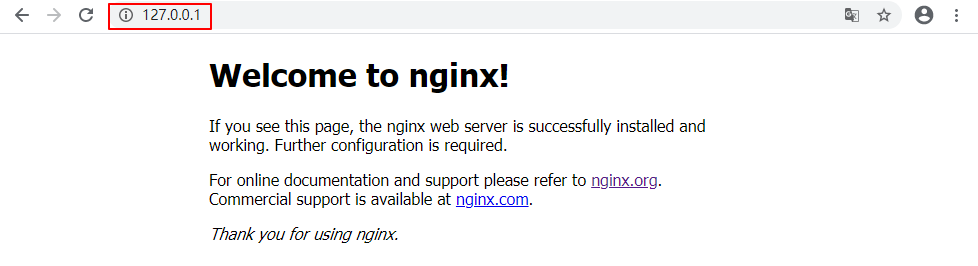
4.1 浏览器访问

直接在浏览器地址栏输入网址 http://127.0.0.1:80http://localhost:80,回车,出现以下页面说明启动成功:

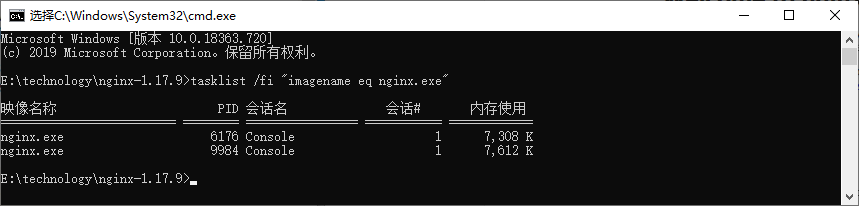
4.2 命令行检查

在 cmd 命令窗口输入命令 tasklist /fi "imagename eq nginx.exe",出现如下结果说明启动成功:

4.3 相关说明

  • nginx 的配置文件是 conf 目录下的 nginx.conf
  • 默认配置的 nginx 监听的端口为 80,如果 80 端口被占用可以修改为未被占用的端口
  • 检查 80 端口是否被占用的命令是:netstat -ano | findstr 0.0.0.0:80
  • 当我们修改了 nginx 的配置文件 nginx.conf 时,不需要关闭 nginx 后重新启动,只需要执行命令 nginx -s reload 即可让改动生效

五、配置 nginx.conf 文件

默认的 nginx.conf 文件并没有配置 RTMP 服务器,需要我们手动添加配置。具体步骤为:在 conf 目录中,复制粘贴 nginx.conf 文件并将其重命名为 nginx-win.conf,修改其内容为:

1
2
3
4
5
6
7
8
9
10
11
12
13
14
15
16
17
18
19
20
21
22
23
24
25
26
27
28
29
30
31
32
33
34
35
36
37
38
39
40
41
42
43
44
45
46
47
48
49
50
51
52
53
54
55
56
#user  nobody;
worker_processes 2;

events {
worker_connections 8192;
}

rtmp {
server {
listen 1935;
chunk_size 4000;
application live {
live on;
}
}
}

http {
include mime.types;
default_type application/octet-stream;

sendfile off;
server_names_hash_bucket_size 128;

client_body_timeout 10;
client_header_timeout 10;
keepalive_timeout 30;
send_timeout 10;
keepalive_requests 10;

server {
listen 80;
server_name localhost;

location /stat {
rtmp_stat all;
rtmp_stat_stylesheet stat.xsl;
}
location /stat.xsl {
root nginx-rtmp-module/;
}
location /control {
rtmp_control all;
}

location / {
root html;
index index.html index.htm;
}

error_page 500 502 503 504 /50x.html;
location = /50x.html {
root html;
}
}
}

这里监听端口未改动,仍然为 80,重点添加了 RTMP 服务器的相关配置,以搭建 RTMP 服务器,rtmp 协议的默认端口号是 1935。


六、标准 nginx 方式(失败)

按住 Windows 键 +R,输入 cmd,进入 cmd 命令窗口,进入 nginx 目录:cd E:\technology\nginx-1.17.9,然后启动 nginx rtmp 服务器:

1
nginx.exe -c conf\nginx-win.conf

6.1 错误信息

1
nginx: [emerg] unknown directive "rtmp" in E:\technology\nginx-1.17.9/conf\nginx-win.conf:19

6.2 原因

nginx 的 windows 版本可能在编译的时候没有对 rtmp 模块进行编译导致使用不了。

6.3 解决方案

方法1:下载源码重新进行编译并把 rtmp 模块进行编译进去

过程较为繁琐,不推荐。有兴趣的可以参考:win7下nginx-rtmp-module的编译方法

方法2:下载带 rtmp 模块的 nginx 版本,如 nginx 1.7.11.3 Gryphon

后续亲测可用。


七、nginx Gryphon 方式(成功)

7.1 下载 nginx 1.7.11.3 Gryphon

下载带 rtmp 模块的 nginx 版本,下载地址为:http://nginx-win.ecsds.eu/download/nginx

下载完成后解压,将解压后的目录名 nginx 1.7.11.3 Gryphon 改成 nginx-1.7.11.3-Gryphon

7.2 下载服务器状态检查程序

下载 nginx-rtmp-module,下载地址为:https://github.com/arut/nginx-rtmp-module

将 nginx-rtmp-module-master.zip 解压后复制到目录 nginx-1.7.11.3-Gryphon 下,保证 stat.xls 的目录为:nginx-1.7.11.3-Gryphon\nginx-rtmp-module\stat.xsl

7.3 配置文件

配置文件 conf\nginx-win.conf 与上面第 5 节一致

7.4 启动服务器

按住 Windows 键 +R,输入 cmd,进入 cmd 命令窗口,进入 nginx 目录:cd E:\technology\nginx-1.7.11.3-Gryphon,然后启动 nginx rtmp 服务器:

1
nginx.exe -c conf\nginx-win.conf

八、RTMP 推流测试

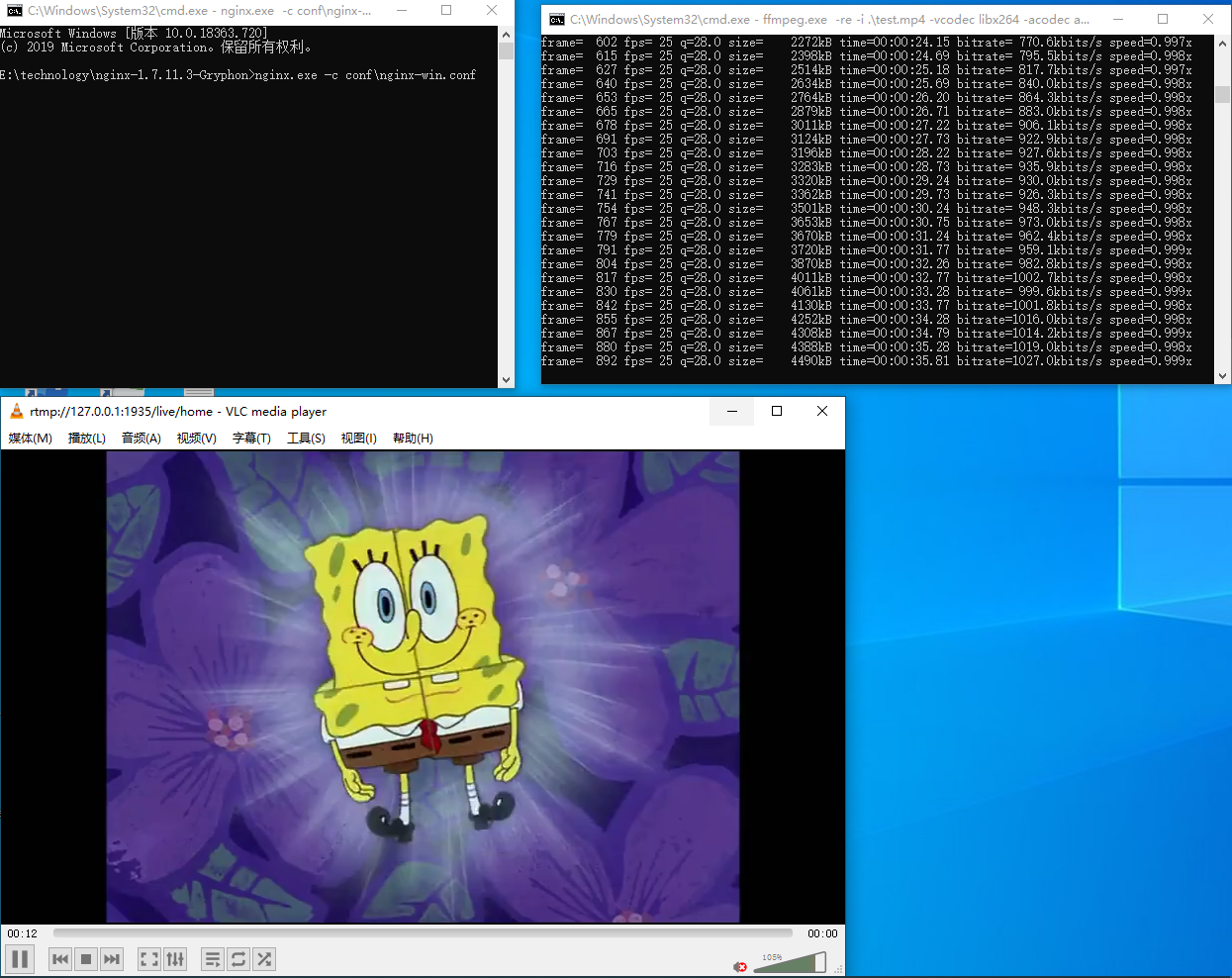
8.1 FFmpeg 本地视频推流

1
ffmpeg.exe -re -i .\test.mp4 -vcodec libx264 -acodec aac -f flv rtmp://127.0.0.1:1935/live/home

8.2 VLC 播放器拉流

使用 VLC 播放器测试,输入网络 URL:rtmp://127.0.0.1:1935/live/home

上面 IP 地址均可换成本地 IP

8.3 摄像头推流测试

1
ffmpeg -f dshow -i video="FHD Camera" -vcodec libx264 -preset:v ultrafast -tune:v zerolatency -f flv rtmp://127.0.0.1:1935/live/home

在设备管理器的”照相机”处,获得摄像头设备名称摄像头为”FHD Camera”。更多推流命令请参考:Windows 搭建 nginx rtmp服务器


九、关闭 nginx

如果使用 cmd 命令窗口启动 nginx,关闭 cmd 窗口是不能结束 nginx 进程的,可使用两种方法关闭 nginx:

(1)输入 nginx 命令:nginx -s stop(快速停止 nginx)或 nginx -s quit(完整有序的停止 nginx)

(2)使用 taskkill 命令:taskkill /f /t /im nginx.exe


十、Linux 平台搭建

10.1 安装 nginx(带 rtmp 模块)

1. 下载稳定版本的 nginx

下载地址:http://nginx.org

2. 下载 rtmp 模块

下载地址:https://github.com/arut/nginx-rtmp-module

1
git clone https://github.com/arut/nginx-rtmp-module.git

3. 解压并编译 nginx

解压 nginx 的 tar 包,确保 nginx 和 rtmp 模块在同一目录

1
nginx-1.12.2  nginx-1.12.2.tar.gz  nginx-rtmp-module

进入 nginx 解压目录配置编译参数:

1
./configure --prefix=/usr/local/nginx --add-module=../nginx-rtmp-module --with-http_ssl_module

4. 编译安装

1
make && make install

如果已安装 nginx 可以在已有 nginx 上面增加模块,参考:https://www.cnblogs.com/zhangmingda/p/12622590.html

10.2 nginx.conf 配置

1
2
3
4
5
6
7
8
9
10
11
12
13
14
15
16
17
18
19
20
21
22
23
24
25
26
27
28
29
30
31
32
33
34
35
36
37
38
39
40
41
42
43
44
45
46
47
48
49
50
51
52
53
54
55
56
57
58
59
60
61
62
63
64
65
66
67
68
69
70
71
72
73
74
75
76
77
78
79
80
81
82
83
84
85
86
87
88
89
90
91
92
93
94
95
96
user nginx;
worker_processes auto;
error_log /var/log/nginx/error.log;
pid /run/nginx.pid;

events {
worker_connections 1024;
}

http {
log_format main '$remote_addr - $remote_user [$time_local] "$request" '
'$status $body_bytes_sent "$http_referer" '
'"$http_user_agent" "$http_x_forwarded_for"';

access_log /var/log/nginx/access.log main;

sendfile on;
tcp_nopush on;
tcp_nodelay on;
keepalive_timeout 65;
types_hash_max_size 2048;

include /etc/nginx/mime.types;
default_type application/octet-stream;

server {
listen 80 default_server;
server_name _;
root /usr/share/nginx/html;

# RTMP 状态页面
location /stat {
rtmp_stat all;
rtmp_stat_stylesheet stat.xsl;
}
location /stat.xsl {
root /opt/rtmp/nginx-rtmp-module/;
}

# HLS 视频流
location /hls {
types {
application/vnd.apple.mpegurl m3u8;
video/mp2t ts;
}
autoindex on;
alias /usr/share/nginx/html/hls;
expires -1;
add_header Cache-Control no-cache;
add_header 'Access-Control-Allow-Origin' '*';
add_header 'Access-Control-Allow-Credentials' 'true';
add_header 'Access-Control-Allow-Methods' 'GET, POST, OPTIONS';
add_header 'Access-Control-Allow-Headers' 'DNT,X-CustomHeader,Keep-Alive,User-Agent,X-Requested-With,If-Modified-Since,Cache-Control,Content-Type';
}
}

server {
listen 443 ssl http2 default_server;
ssl_certificate "/etc/pki/nginx/server.crt";
ssl_certificate_key "/etc/pki/nginx/private/server.key";
ssl_session_cache shared:SSL:1m;
ssl_session_timeout 10m;
ssl_ciphers HIGH:!aNULL:!MD5;
ssl_prefer_server_ciphers on;
}
}

# RTMP 直播配置
rtmp {
server {
listen 1935;
chunk_size 4000;

# 点播
application vod {
play /usr/share/nginx/html/vod/flvs/;
}

# 直播
application live {
live on;
}

# HLS 直播
application hls {
live on;
hls on;
hls_path /usr/share/nginx/html/hls;
hls_fragment 5s;
hls_playlist_length 15s;
hls_continuous on;
hls_cleanup on;
hls_nested on;
}
}
}

十一、点播与直播功能

11.1 点播功能

1. 创建点播目录

1
mkdir /usr/share/nginx/html/vod/flvs/

将 test.flv 视频文件存放到该目录

2. 使用 VLC 播放器播放

播放按钮可以输入 rtmp:// 的连接,步骤为:播放 > 播放 > 网络媒体

3. 移动端播放

安卓手机万能播放器:我的 > 连接播放 > 输入 url 即可播放

11.2 直播功能

1. 推流

电脑端 OBS 可以输入推流地址 rtmp://IP/live/test 进行推流,其中 live 为配置文件中定义的直播应用,test 为自定义流名称

2. 拉流

使用 VLC 播放器输入:rtmp://127.0.0.1/live/test

3. HLS 协议

  • 推流:使用 rtmp://IP/应用名/流名称 进行推流
  • 拉流:支持 http 协议访问 hls 应用下流名称.m3u8 文件
1
2
3
4
5
6
7
8
<html>
<head>welcome test nginx-rtmp-module <br></head>
<body>
<video>
<source src="http://127.0.0.1/hls/test/index.m3u8"/>
</video>
</body>
</html>

十二、直播录制

12.1 flv.js 播放直播录制视频

1
2
3
4
5
6
7
8
9
10
11
12
13
14
15
16
17
18
19
20
21
22
23
24
25
26
27
28
29
30
31
32
33
34
35
36
37
38
39
40
41
42
43
44
45
46
47
48
49
50
51
52
53
54
55
56
57
58
59
<!DOCTYPE html>
<html>
<head>
<meta content="text/html; charset=utf-8" http-equiv="Content-Type">
<title>flv.js demo</title>
<style>
.mainContainer { display: block; width: 1024px; margin-left: auto; margin-right: auto; }
.urlInput { display: block; width: 100%; margin-left: auto; margin-right: auto; margin-top: 8px; margin-bottom: 8px; }
.centeredVideo { display: block; width: 100%; height: 576px; margin-left: auto; margin-right: auto; margin-bottom: auto; }
.controls { display: block; width: 100%; text-align: left; margin-left: auto; margin-right: auto; }
</style>
</head>
<body>
<div class="mainContainer">
<video id="videoElement" class="centeredVideo" controls autoplay width="1024" height="576">Your browser is too old which doesn't support HTML5 video.</video>
</div>
<br>
<div>
<input style="width:500px" type="text" placeholder="请输入flv链接" id="flvUrl" />
<button onclick="load_flv()">加载</button>
</div>
<br>
<div class="controls">
<button onclick="flv_start()">开始</button>
<button onclick="flv_pause()">暂停</button>
<button onclick="flv_destroy()">停止</button>
<input style="width:100px" type="text" name="seekpoint" />
<button onclick="flv_seekto()">跳转</button>
</div>
<script src="flv.min.js"></script>
<script>
var player = document.getElementById('videoElement');
function load_flv() {
var flvurl = document.getElementById('flvUrl').value;
console.log(flvurl);
if (flvjs.isSupported()) {
var flvPlayer = flvjs.createPlayer({
type: 'flv',
url: flvurl
});
flvPlayer.attachMediaElement(videoElement);
flvPlayer.load();
}
}
function flv_start() { player.play(); }
function flv_pause() { player.pause(); }
function flv_destroy() {
player.pause();
player.unload();
player.detachMediaElement();
player.destroy();
player = null;
}
function flv_seekto() {
player.currentTime = parseFloat(document.getElementsByName('seekpoint')[0].value);
}
</script>
</body>
</html>

十三、nginx-rtmp-module 指令详解

13.1 核心指令

指令 语法 上下文 说明
rtmp rtmp { ... } 保存所有 RTMP 配置的块
server server { ... } rtmp 声明一个 RTMP 实例
listen listen (addr[:port]|port|unix:path) [bind] server 给 NGINX 添加一个监听端口以接收 RTMP 连接
application application name { ... } server 创建一个 RTMP 应用
timeout timeout value rtmp, server Socket 超时,默认值为 1 分钟
ping ping value rtmp, server RTMP ping 间隔,默认值为一分钟
chunk_size chunk_size value rtmp, server, application 流整合的最大块大小,默认值为 4096

13.2 直播相关指令

指令 说明
live on 开启直播模式
meta on/off 切换发送元数据到客户端,默认为 on
interleave on/off 切换交叉模式,音频和视频数据会在同一个 RTMP chunk 流中传输
wait_key on/off 使视频流从一个关键帧开始
wait_video on/off 在第一个视频帧发送之前禁用音频
publish_notify on/off 发送 NetStream.Publish.Start 和 NetStream.Publish.Stop 给用户
sync timeout 同步音频和视频流,默认值为 300 ms

13.3 录制相关指令

指令 说明
record [off|all|audio|video|keyframes|manual] 切换录制模式
record_path path 指定录制的 flv 文件存放目录
record_suffix value 设置录制文件后缀名,默认为 ‘.flv’
record_max_size size 设置录制文件的最大值
record_max_frames nframes 设置每个录制文件的视频帧的最大数量
record_interval time 录制间隔
record_notify on/off 录制状态通知

示例:

1
2
3
4
5
recorder myrec {
record all manual;
record_path /var/rec;
record_notify on;
}

13.4 HLS 相关指令

指令 说明
hls on/off 在 application 切换 HLS
hls_path path 设置 HLS 播放列表和分段目录
hls_fragment time 设置 HLS 分段长度,默认为 5 秒钟
hls_playlist_length time 设置 HLS 播放列表长度,默认为 30 秒钟
hls_continuous on/off 切换 HLS 连续模式
hls_nested on/off 切换 HLS 嵌套模式
hls_cleanup on/off 切换 HLS 清理

13.5 访问控制

1
2
3
4
5
6
7
# 允许/禁止发布
allow publish 127.0.0.1;
deny publish all;

# 允许/禁止播放
allow play 192.168.0.0/24;
deny play all;

13.6 外部命令执行

定义每个流发布时要执行的带有参数的外部命令:

1
exec ffmpeg -i rtmp://localhost/src/$name -vcodec libx264 -acodec aac -f flv rtmp://localhost/hls/$name;

可用变量:

  • $name - 流的名字
  • $app - 应用名
  • $addr - 客户端地址
  • $flashver - 客户端 flash 版本
  • $swfurl - 客户端 swf url
  • $tcurl - 客户端 tc url
  • $pageurl - 客户端页面 url

13.7 回调函数

指令 说明
on_connect url 设置 HTTP 连接回调
on_play url 设置 HTTP 播放回调
on_publish url 设置 HTTP 发布回调
on_done url 设置播放/发布禁止回调
on_record_done url 设置录制完成回调
on_update url 设置 update 回调

13.8 Relay 相关指令

指令 说明
pull url [key=value]* 创建 pull 中继,流将从远程服务器上拉下来
push url [key=value]* 推送发布流到远程服务器
push_reconnect time push 重新连接前等待的时间,默认为 3 秒
session_relay on/off 切换会话 relay 模式

13.9 其他指令

指令 说明
max_connections number 为 rtmp 引擎设置最大连接数
rtmp_auto_push on/off 切换自动推送(多 worker 直播流)模式
rtmp_control all 设置 RTMP 控制程序

参考链接

一、安装方式选择

自动安装

使用 basicbench 包中的预置脚本:

1
2
# 来源:basicbench/GCC(by 侯宇)
# 将目录打包到目标机器执行自动安装脚本

手动安装

适用于需要自定义配置的场景,步骤如下:


二、手动安装步骤

1. 检查当前版本

1
gcc --version

2. 下载依赖包

GCC 4.8.2 需要以下依赖(版本要求):

  • GMP ≥ 4.2
  • MPFR ≥ 2.3.1
  • MPC ≥ 0.8.0
1
2
3
4
5
6
7
8
9
10
11
12
13
14
15
16
17
cd /tmp
# 下载GCC源码
wget https://ftp.gnu.org/gnu/gcc/gcc-4.8.2/gcc-4.8.2.tar.bz2
tar xvjf gcc-4.8.2.tar.bz2

# 下载依赖库
wget http://10.88.162.17/software/gcc62/gmp-4.3.2.tar.bz2
tar xvjf gmp-4.3.2.tar.bz2

wget http://10.88.162.17/software/gcc62/mpc-0.8.1.tar.gz
tar xvzf mpc-0.8.1.tar.gz

wget http://10.88.162.17/software/gcc62/mpfr-2.4.2.tar.bz2
tar xvjf mpfr-2.4.2.tar.bz2

wget http://10.88.162.17/software/gcc62/binutils-2.27.tar.bz2
tar xvjf binutils-2.27.tar.bz2

3. 编译安装依赖库

按顺序安装(必须严格遵循此顺序):

3.1 GMP(GNU Multiple Precision Arithmetic Library)

1
2
3
4
5
cd /tmp/gmp-4.3.2
mkdir build && cd build
../configure --prefix=/opt/compiler/gcc-4.8.2
make -j20
make install

3.2 MPFR(Multiple Precision Floating-Point Reliable Library)

1
2
3
4
5
cd /tmp/mpfr-2.4.2
mkdir build && cd build
../configure --prefix=/opt/compiler/gcc-4.8.2 --with-gmp=/opt/compiler/gcc-4.8.2
make -j20
make install

3.3 MPC(Multiple Precision Complex Library)

1
2
3
4
5
6
7
cd /tmp/mpc-0.8.1
mkdir build && cd build
../configure --prefix=/opt/compiler/gcc-4.8.2 \
--with-gmp=/opt/compiler/gcc-4.8.2 \
--with-mpfr=/opt/compiler/gcc-4.8.2
make -j20
make install

4. 编译安装GCC

关键配置选项说明:

  • --prefix:安装路径
  • --disable-multilib:关闭跨平台支持(32/64位兼容)
  • --enable-languages:启用语言(默认all,可选c,c++,fortran等)
1
2
3
4
5
6
7
8
9
10
11
12
13
14
15
# 设置临时库路径
export LD_LIBRARY_PATH=/opt/compiler/gcc-4.8.2/lib/:$LD_LIBRARY_PATH

cd /tmp/gcc-4.8.2
mkdir build && cd build
../configure --prefix=/opt/compiler/gcc-4.8.2 \
--with-gmp=/opt/compiler/gcc-4.8.2 \
--with-mpc=/opt/compiler/gcc-4.8.2 \
--with-mpfr=/opt/compiler/gcc-4.8.2 \
--enable-checking=release \
--enable-ld=yes \
--enable-gold=yes \
--disable-multilib
make -j20
make install

5. 编译Binutils(可选)

1
2
3
4
5
6
7
8
9
10
cd /tmp/binutils-2.27  # 注意原文拼写错误:bintuils → binutils
mkdir build && cd build
../configure --prefix=/opt/compiler/gcc-4.8.2 \
--enable-ld=yes \
--enable-gold=yes \
--with-gmp=/opt/compiler/gcc-4.8.2 \
--with-mpfr=/opt/compiler/gcc-4.8.2 \ # 注意原文拼写错误:mprf → mpfr
--with-mpc=/opt/compiler/gcc-4.8.2
make -j20
make install

三、环境配置

1. 永久生效配置

1
2
3
4
# 添加到用户profile
echo 'export PATH=/opt/compiler/gcc-4.8.2/bin/:$PATH' >> ~/.bash_profile
echo 'export LD_LIBRARY_PATH=/opt/compiler/gcc-4.8.2/lib/:/opt/compiler/gcc-4.8.2/lib64/:$LD_LIBRARY_PATH' >> ~/.bash_profile
source ~/.bash_profile

2. 软链接方案(推荐)

保留系统原GCC,通过版本化命令调用新版本:

1
2
3
ln -s /opt/compiler/gcc-4.8.2/bin/gcc /usr/local/bin/gcc482
ln -s /opt/compiler/gcc-4.8.2/bin/g++ /usr/local/bin/g++482
ln -s /opt/compiler/gcc-4.8.2/bin/gcj /usr/local/bin/gcj482

优势:可同时使用多个GCC版本,避免污染系统环境

3. 库路径补充配置

若需显式指定所有依赖库路径:

1
2
3
4
5
6
7
# 在 ~/.bash_profile 或 /etc/profile 中添加
LD_LIBRARY_PATH=/opt/compiler/gcc-4.8.2/gmp-4.3.2/lib:\
/opt/compiler/gcc-4.8.2/mpfr-2.4.2/lib:\
/opt/compiler/gcc-4.8.2/mpc-0.8.1/lib:\
/opt/compiler/gcc-4.8.2/lib:\
$LD_LIBRARY_PATH
export LD_LIBRARY_PATH

四、验证安装

1
2
3
4
5
6
7
# 检查版本
gcc --version # 应显示 gcc (GCC) 4.8.2

# 测试编译
echo 'int main(){return 0;}' > test.c
gcc482 test.c -o test # 使用软链接命令
./test

常见问题处理

  1. 编译错误:确保依赖库安装顺序正确(GMP → MPFR → MPC)
  2. 库路径问题:临时设置 LD_LIBRARY_PATH 再编译GCC
  3. 权限问题:安装目录 /opt/compiler/ 需有写权限
  4. 拼写错误修正
    • bintuilsbinutils
    • mprfmpfr

Shiro

  • 登陆、授权、拦截
  • 按钮权限控制

一、目标

  • Maven+Spring+shiro
  • 自定义登陆、授权
  • 自定义拦截器
  • 加载数据库资源构建拦截链

使用总结:

1、需要设计的数据库:用户、角色、权限、资源

2、可以通过,角色,权限,两个拦截器同时确定是否能访问

3、角色与权限的关系,role1=permission1,permission2,多级的权限:sys:permission1,拥有高级权限同时用于低级权限。

4、perms[“permission1”] 为权限

5、拦截器机制介绍了拦截角色还是权限

6、角色与权限 是两个概念

7、权限-资源,一对一。资源分为上下级,因此权限分为父权限,子权限。创建资源的时候,创建权限。权限里资源的别名

8、角色-权限,一对多。角色里权限的别名

9、按钮是通过权限来控制的

10、防止有父级资源可以访问,子级资源不能访问的情况,不适用 sys:add 权限写法

二、代码

1、Pom.xml

复制代码

1 <properties>
2 <spring.version>4.3.4.RELEASE</spring.version>
3 </properties>
4 <dependency>
5 <groupId>junit</groupId>
6 <artifactId>junit</artifactId>
7 <version>4.9</version>
8 </dependency>
9 <dependency>
10 <groupId>commons-logging</groupId>
11 <artifactId>commons-logging</artifactId>
12 <version>1.1.3</version>
13 </dependency>
14 <dependency>
15 <groupId>org.apache.shiro</groupId>
16 <artifactId>shiro-core</artifactId>
17 <version>1.2.2</version>
18 </dependency>
19 <dependency>
20 <groupId>org.apache.shiro</groupId>
21 <artifactId>shiro-spring</artifactId>
22 <version>1.2.2</version>
23 </dependency>
24 <dependency>
25 <groupId>javax.servlet</groupId>
26 <artifactId>javax.servlet-api</artifactId>
27 <version>3.0.1</version>
28 <scope>provided</scope>
29 </dependency>
30 <dependency>
31 <groupId>org.springframework</groupId>
32 <artifactId>spring-web</artifactId>
33 <version>${spring.version}</version>
34 </dependency>
35
36 org.apache.shiro
37 shiro-ehcache
38 1.2.2
39

40
41 org.springframework
42 spring-context
43 ${spring.version}
44

45
46 org.apache.shiro
47 shiro-web
48 1.2.2
49

50
51 net.sf.ehcache
52 ehcache
53 2.10.1
54

复制代码

2、web.xml

  Servlet拦截访问,使用注解更方便,需要删除项目中的servlet使用javax.servlet-api 3.0 包

复制代码

1 package com.cyd.shiro;
2
3 import java.io.IOException;
4
5 import javax.servlet.ServletException;
6 import javax.servlet.annotation.WebServlet;
7 import javax.servlet.http.HttpServlet;
8 import javax.servlet.http.HttpServletRequest;
9 import javax.servlet.http.HttpServletResponse;
10
11 import org.apache.shiro.SecurityUtils;
12 import org.apache.shiro.authc.AuthenticationException;
13 import org.apache.shiro.authc.IncorrectCredentialsException;
14 import org.apache.shiro.authc.UnknownAccountException;
15 import org.apache.shiro.authc.UsernamePasswordToken;
16 import org.apache.shiro.subject.Subject;
17 import org.apache.shiro.web.util.SavedRequest;
18 import org.apache.shiro.web.util.WebUtils;
19 import org.junit.Test;
20
21 @WebServlet(name = “loginServlet”, urlPatterns = “/loginController”)
22 public class LoginServlet extends HttpServlet {
23 @Override
24 protected void doGet(HttpServletRequest req, HttpServletResponse resp) throws ServletException, IOException {
25 req.getRequestDispatcher(“login.jsp”).forward(req, resp);
26 }
27
28 @Override
29 protected void doPost(HttpServletRequest req, HttpServletResponse resp) throws ServletException, IOException {
30 System.out.println(LoginServlet.class.toString());
31 String error = null;
32 String username = req.getParameter(“username”);
33 String password = req.getParameter(“password”);
34 Subject subject = SecurityUtils.getSubject();
35 UsernamePasswordToken token = new UsernamePasswordToken(username, password);
36 try {
37 subject.login(token);
38 } catch (UnknownAccountException e) {
39 error = “用户名/密码错误”;
40 } catch (IncorrectCredentialsException e) {
41 error = “用户名/密码错误”;
42 } catch (AuthenticationException e) {
43 // 其他错误,比如锁定,如果想单独处理请单独catch处理
44 error = “其他错误:” + e.getMessage();
45 }
46 if (error != null) {// 出错了,返回登录页面
47 req.setAttribute(“error”, error);
48 req.getRequestDispatcher(“login.jsp”).forward(req, resp);
49 } else {// 登录成功
50 //跳转到拦截登陆前的地址
51 SavedRequest request=WebUtils.getSavedRequest(req);
52 String url =request.getRequestURI();
53 req.getRequestDispatcher(url.substring(url.lastIndexOf(‘/‘))).forward(req, resp);
54 }
55 }
56
57 }

复制代码

3、Spring-shiro.xml

复制代码

<beans xmlns=“http://www.springframework.org/schema/beans“ xmlns:xsi=“http://www.w3.org/2001/XMLSchema-instance“ xmlns:context=“http://www.springframework.org/schema/context“ xmlns:util=“http://www.springframework.org/schema/util“ xsi:schemaLocation=“http://www.springframework.org/schema/beans
http://www.springframework.org/schema/beans/spring-beans.xsd
http://www.springframework.org/schema/context
http://www.springframework.org/schema/context/spring-context.xsd
http://www.springframework.org/schema/util
http://www.springframework.org/schema/util/spring-util-4.2.xsd"\>

<context:component-scan base-package\="com.cyd.shiro.\*"\></context:component-scan\>

<!-- Shiro的Web过滤器 \-->
<bean id\="shiroFilter" class\="com.cyd.shiro.ExtendShiroFilterFactoryBean"\>
    <property name\="securityManager" ref\="securityManager" />
    <property name\="loginUrl" value\="/login.jsp" />
    <!-- <property name="successUrl" value="/index.jsp" /> \-->
    <property name\="unauthorizedUrl" value\="/unauthorized.jsp" />
    <property name\="filters"\>
        <util:map\>
            <!-- <entry key="onperms" value-ref="URLPermissionsFilter" /> \-->
            <entry key\="onrole" value-ref\="ExtendRolesAuthorizationFilter" />
        </util:map\>
    </property\> 
    <property name\="filterChainDefinitions"\>
        <value\> /unauthorized.jsp = anon
            /logoutController=anon
            /login.jsp=authc
        </value\>
    </property\>
</bean\>

<!-- 安全管理器 \-->
<bean id\="securityManager" class\="org.apache.shiro.web.mgt.DefaultWebSecurityManager"\>
    <property name\="realm" ref\="myRealm" />
    <property name\="cacheManager" ref\="cacheManager" />
</bean\>
<!-- 自定义认证,授权 \-->
<bean id\="myRealm" class\="com.cyd.shiro.AdminRealm"\></bean\>

<!-- 注册ehcache,不然每次访问都要登陆 \-->
<bean id\="cacheManager" class\="org.apache.shiro.cache.ehcache.EhCacheManager"\>
    <property name\="cacheManagerConfigFile" value\="classpath:ehcache.xml" />
</bean\>
<!-- 自定义鉴权拦截器 \-->
<bean id\="URLPermissionsFilter" class\="com.cyd.shiro.URLPermissionsFilter" />
<bean id\="ExtendRolesAuthorizationFilter" class\="com.cyd.shiro.ExtendRolesAuthorizationFilter" />

</beans>

复制代码

4、Ehcache.xml 缓存

复制代码

<ehcache xmlns:xsi=“http://www.w3.org/2001/XMLSchema-instance“ xsi:noNamespaceSchemaLocation=“../config/ehcache.xsd”>
<diskStore path=“java.io.tmpdir”/>
<defaultCache
maxElementsInMemory=“10000” eternal=“false” timeToIdleSeconds=“600” timeToLiveSeconds=“600” overflowToDisk=“true” maxElementsOnDisk=“10000000” diskPersistent=“false” diskExpiryThreadIntervalSeconds=“120” memoryStoreEvictionPolicy=“LRU”
/>

</ehcache>

复制代码

5、登陆Servlet

复制代码

package com.cyd.shiro;

import java.io.IOException;

import javax.servlet.ServletException;
import javax.servlet.annotation.WebServlet;
import javax.servlet.http.HttpServlet;
import javax.servlet.http.HttpServletRequest;
import javax.servlet.http.HttpServletResponse;

import org.apache.shiro.SecurityUtils;
import org.apache.shiro.authc.AuthenticationException;
import org.apache.shiro.authc.IncorrectCredentialsException;
import org.apache.shiro.authc.UnknownAccountException;
import org.apache.shiro.authc.UsernamePasswordToken;
import org.apache.shiro.subject.Subject;
import org.apache.shiro.web.util.SavedRequest;
import org.apache.shiro.web.util.WebUtils;

@WebServlet(name = “loginServlet”, urlPatterns = “/loginController”)
public class LoginServlet extends HttpServlet {
@Override
protected void doGet(HttpServletRequest req, HttpServletResponse resp) throws ServletException, IOException {
req.getRequestDispatcher(“login.jsp”).forward(req, resp);
}

@Override
protected void doPost(HttpServletRequest req, HttpServletResponse resp) throws ServletException, IOException {
    System.out.println(LoginServlet.class.toString());
    String error = null;
    String username = req.getParameter("username");
    String password = req.getParameter("password");
    Subject subject = SecurityUtils.getSubject();
    UsernamePasswordToken token = new UsernamePasswordToken(username, password);
    try {
        subject.login(token); 
    } catch (UnknownAccountException e) { 
        error = "用户名/密码错误";
    } catch (IncorrectCredentialsException e) {
        error = "用户名/密码错误";
    } catch (AuthenticationException e) {
        // 其他错误,比如锁定,如果想单独处理请单独catch处理
        error = "其他错误:" + e.getMessage();
    }
    if (error != null) {// 出错了,返回登录页面
        req.setAttribute("error", error);
        req.getRequestDispatcher("login.jsp").forward(req, resp);
    } else {// 登录成功
        //跳转到拦截登陆前的地址
        SavedRequest request=WebUtils.getSavedRequest(req);
        String url =request.getRequestURI();
        req.getRequestDispatcher(url.substring(url.lastIndexOf('/'))).forward(req, resp);
    }
}

}

复制代码

6、自定义登陆、授权。

  根据需求自定义登陆异常。从数据库查询出当前用户拥有的权限并授权

复制代码

1 package com.cyd.shiro;
2
3 import java.util.HashSet;
4 import java.util.LinkedList;
5 import java.util.List;
6 import java.util.Set;
7
8 import org.apache.shiro.authc.AuthenticationException;
9 import org.apache.shiro.authc.AuthenticationInfo;
10 import org.apache.shiro.authc.AuthenticationToken;
11 import org.apache.shiro.authc.SimpleAuthenticationInfo;
12 import org.apache.shiro.authc.UnknownAccountException;
13 import org.apache.shiro.authz.AuthorizationInfo;
14 import org.apache.shiro.authz.SimpleAuthorizationInfo;
15 import org.apache.shiro.realm.AuthorizingRealm;
16 import org.apache.shiro.subject.PrincipalCollection;
17 import org.springframework.beans.factory.annotation.Autowired;
18
19 import com.cyd.helloworld.SysRoles;
20 import com.cyd.helloworld.SysUsers;
21 import com.cyd.shiro.admin.SysUsersService;
22
23 public class AdminRealm extends AuthorizingRealm {
24
25 @Autowired
26 private SysUsersService sysusersservice;
27 // 认证登陆
28 @Override
29 protected AuthenticationInfo doGetAuthenticationInfo(AuthenticationToken token) throws AuthenticationException {
30 System.out.println(“do doGetAuthenticationInfo”);
31 String username = (String) token.getPrincipal();
32 SysUsers user = sysusersservice.getSysUsers(username);
33 if (user == null) {
34 throw new UnknownAccountException();// 没找到帐号
35 }
36 SimpleAuthenticationInfo authenticationInfo = new SimpleAuthenticationInfo(user.getUserName(), // 用户名
37 user.getPassWorld(), // 密码
38 getName() // realm name
39 );
40 return authenticationInfo;
41 }
42
43 // 用户授权
44 @Override
45 protected AuthorizationInfo doGetAuthorizationInfo(PrincipalCollection principals) {
46 System.out.println(“do doGetAuthorizationInfo”);
47 String username = (String)principals.getPrimaryPrincipal();
48 SimpleAuthorizationInfo authorizationInfo = new SimpleAuthorizationInfo();
49 //从数据库加载当前用户的角色,例如:[admin]
50 authorizationInfo.setRoles(new HashSet(sysusersservice.getSysRoles(username)));
51 //从数据库加载当前用户可以访问的资源,例如:[index.jsp, abc.jsp]
52 authorizationInfo.setStringPermissions(new HashSet(sysusersservice.getSysResource(username)));
53
54 return authorizationInfo;
55 }
56 }

复制代码

7、自定义拦截器。

  重写拦截器是因为shiro 验证是否有权限访问是需要当前用户拥有拦截器链的所有权限。一般需求只需要拥有部分权限即可。

       角色验证拦截,hasRole和hasAllRoles 验证是否有权限。

复制代码

1 package com.cyd.shiro;
2
3 import java.io.IOException;
4 import java.util.Set;
5
6 import javax.servlet.ServletRequest;
7 import javax.servlet.ServletResponse;
8
9 import org.apache.shiro.subject.Subject;
10 import org.apache.shiro.util.CollectionUtils;
11 import org.apache.shiro.web.filter.authz.RolesAuthorizationFilter;
12
13 /**
14 * 通过角色验证权限
15 * @author chenyd
16 * 2017年11月21日
17 */
18 public class ExtendRolesAuthorizationFilter extends RolesAuthorizationFilter{
19
20 @Override
21 public boolean isAccessAllowed(ServletRequest request, ServletResponse response, Object mappedValue) throws IOException {
22
23 System.out.println(ExtendRolesAuthorizationFilter.class.toString());
24 Subject subject = getSubject(request, response);
25 String[] rolesArray = (String[]) mappedValue;
26
27 if (rolesArray == null || rolesArray.length == 0) {
28 //no roles specified, so nothing to check - allow access.
29 return true;
30 }
31 //AbstractFilter
32 Set roles = CollectionUtils.asSet(rolesArray);
33
34 boolean flag=false;
35 for(String role: roles){
36 if(subject.hasRole(role)){
37 flag=true;
38 break;
39 }
40 }
41 return flag;
42 }
43 }

复制代码

       url拦截校验,isPermitted和isPermittedAll验证是否有权限访问,

复制代码

1 package com.cyd.shiro;
2
3 import java.io.IOException;
4
5 import javax.servlet.ServletRequest;
6 import javax.servlet.ServletResponse;
7 import javax.servlet.http.HttpServletRequest;
8
9 import org.apache.shiro.subject.Subject;
10 import org.apache.shiro.web.filter.authz.PermissionsAuthorizationFilter;
11 /**
12 * 通过字符串验证权限
13 * @author chenyd
14 * 2017年11月21日
15 */
16 public class URLPermissionsFilter extends PermissionsAuthorizationFilter {
17
18 /**
19 * mappedValue 访问该url时需要的权限
20 * subject.isPermitted 判断访问的用户是否拥有mappedValue权限
21 * 重写拦截器,只要符合配置的一个权限,即可通过
22 */
23 @Override
24 public boolean isAccessAllowed(ServletRequest request, ServletResponse response, Object mappedValue)
25 throws IOException {
26 System.out.println(URLPermissionsFilter.class.toString());
27 Subject subject = getSubject(request, response);
28 // DefaultFilterChainManager
29 // PathMatchingFilterChainResolver
30 String[] perms = (String[]) mappedValue;
31 boolean isPermitted = false;
32 if (perms != null && perms.length > 0) {
33 for (String str : perms) {
34 if (subject.isPermitted(str)) {
35 isPermitted = true;
36 }
37 }
38 }
39
40 return isPermitted;
41 }
42 }

复制代码

8、加载数据库资源构建拦截器链

复制代码

1 package com.cyd.shiro;
2
3 import java.util.Map;
4
5 import org.apache.shiro.config.Ini;
6 import org.apache.shiro.spring.web.ShiroFilterFactoryBean;
7 import org.apache.shiro.util.CollectionUtils;
8 import org.apache.shiro.web.config.IniFilterChainResolverFactory;
9 import org.springframework.beans.factory.annotation.Autowired;
10
11 import com.cyd.shiro.admin.SysUsersService;
12
13 public class ExtendShiroFilterFactoryBean extends ShiroFilterFactoryBean{
14
15 @Autowired
16 private SysUsersService sysusersservice;
17 //PathMatchingFilter
18 @Override
19 public void setFilterChainDefinitions(String definitions) {
20 //数据库中获取权限,{/index.jsp=authc,onrole[“admin2”,”admin”], /abc.jsp=authc,onrole[“admin2”,”admin”]}
21 Map<String, String> otherChains = sysusersservice.getFilterChain();
22 Ini ini = new Ini();
23 ini.load(definitions);
24 Ini.Section section = ini.getSection(IniFilterChainResolverFactory.URLS);
25 if (CollectionUtils.isEmpty(section)) {
26 section = ini.getSection(Ini.DEFAULT_SECTION_NAME);
27 }
28 section.putAll(otherChains);
29 setFilterChainDefinitionMap(section);
30 }
31
32 }

复制代码

三、  学习笔记

1、INI文件配置

复制代码

[users] #提供了对用户/密码及其角色的配置,用户名=密码,角色1,角色2

zhang=123,admin

[roles] #提供了角色及权限之间关系的配置,角色=权限1,权限2

admin=index.jsp

[urls] #配置拦截器链,/** 为拦截器链名称(filterChain),authc,roles[admin],perms[“index.jsp”]拦截器列表名

/login.jsp=anon

/loginController=anon

/unauthorized.jsp=anon

/**=authc,roles[admin],perms[“index.jsp”]

复制代码

2、拦截器链

  Shiro的所有拦截器链名定义在源码DefaultFilter中。

anon            

例子/admins/**=anon 没有参数,表示可以匿名使用。 

authc

例如/admins/user/**=authc表示需要认证(登录)才能使用,没有参数  

roles

 例子/admins/user/**=roles[admin],参数可以写多个,多个时必须加上引号,  

 并且参数之间用逗号分割,当有多个参数时,例如admins/user/**=roles[“admin,guest”],  

 每个参数通过才算通过,相当于hasAllRoles()方法。  

perms

例子/admins/user/**=perms[user:add:*],参数可以写多个,多个时必须加上引号,并且参数之间用逗号分割,  

例如/admins/user/**=perms[“user:add:*,user:modify:*“],当有多个参数时必须每个参数都通过才通过,  

想当于isPermitedAll()方法。

rest

例子/admins/user/**=rest[user],根据请求的方法,相当于/admins/user/**=perms[user:method] ,  

 其中method为post,get,delete等。

port

例子/admins/user/**=port[8081],当请求的url的端口不是8081是跳转到schemal://serverName:8081?queryString,  其中schmal是协议http或https等,serverName是你访问的host,8081是url配置里port的端口,queryString是你访问的url里的?后面的参数。

authcBasic                                 

例如/admins/user/**=authcBasic没有参数表示httpBasic认证

ssl

例子/admins/user/**=ssl没有参数,表示安全的url请求,协议为https

user

例如/admins/user/**=user没有参数表示必须存在用户,当登入操作时不做检查  

注:anon,authcBasic,auchc,user是认证过滤器,

perms,roles,ssl,rest,port是授权过滤器

3、拦截器链源码类关系图

①   NameableFilter有一个name属性,定义每一个filter的名字。

②   OncePerRequestFilter保证客户端请求后该filter的doFilter只会执行一次。

  doFilterInternal非常重要,在shiro整个filter体系中的核心方法及实质入口。另外,shiro是通过在request中设置一个该filter特定的属性值来保证该filter只会执行一次的。

③   AdviceFilter中主要是对doFilterInternal做了更细致的切分。

  springmvc中的Interceptor,doFilterInternal会先调用preHandle做一些前置判断,如果返回false则filter链不继续往下执行,

④   AccessControlFilter中的对onPreHandle方法做了进一步细化。

  isAccessAllowed方法和onAccessDenied方法达到控制效果。这两个方法都是抽象方法,由子类去实现。到这一层应该明白。isAccessAllowed和onAccessDenied方法会影响到onPreHandle方法,而onPreHandle方法会影响到preHandle方法,而preHandle方法会达到控制filter链是否执行下去的效果。所以如果正在执行的filter中isAccessAllowed和onAccessDenied都返回false,则整个filter控制链都将结束,不会到达目标方法(客户端请求的接口),而是直接跳转到某个页面(由filter定义的,将会在authc中看到)。

⑤   FormAuthenticationFiltershiro提供的登录的filter,

  saveRequestAndRedirectToLogin保存request并拦截到登陆页面,登陆成功后可从WebUtils.getSavedRequest(req);中取出。

四、未实现的功能

  • 动态URL权限控制。当修改权限时,重新加载拦截器链。
  • 密码加密
  • 记住我
  • 在线人数控制
  • 集成验证码


五、参考链接

同学们有福了,花了一些时间,重新整理了一个最完整的Mybatis Generator(简称MBG)的最完整配置文件,带详解,再也不用去看EN的User Guide了;

复制代码

<generatorConfiguration>

<context id=“mysql” defaultModelType=“hierarchical” targetRuntime=“MyBatis3Simple” >

<!-- 自动识别数据库关键字,默认false,如果设置为true,根据SqlReservedWords中定义的关键字列表;
    一般保留默认值,遇到数据库关键字(Java关键字),使用columnOverride覆盖 \-->
<property name\="autoDelimitKeywords" value\="false"/>
<!-- 生成的Java文件的编码 \-->
<property name\="javaFileEncoding" value\="UTF-8"/>
<!-- 格式化java代码 \-->
<property name\="javaFormatter" value\="org.mybatis.generator.api.dom.DefaultJavaFormatter"/>
<!-- 格式化XML代码 \-->
<property name\="xmlFormatter" value\="org.mybatis.generator.api.dom.DefaultXmlFormatter"/>

<!-- beginningDelimiter和endingDelimiter:指明数据库的用于标记数据库对象名的符号,比如ORACLE就是双引号,MYSQL默认是\`反引号; \-->
<property name\="beginningDelimiter" value\="\`"/>
<property name\="endingDelimiter" value\="\`"/>

<!-- 必须要有的,使用这个配置链接数据库
    @TODO:是否可以扩展 \-->
<jdbcConnection driverClass\="com.mysql.jdbc.Driver" connectionURL\="jdbc:mysql:///pss" userId\="root" password\="admin"\>
    <!-- 这里面可以设置property属性,每一个property属性都设置到配置的Driver上 \-->
</jdbcConnection\>

<!-- java类型处理器 
    用于处理DB中的类型到Java中的类型,默认使用JavaTypeResolverDefaultImpl;
    注意一点,默认会先尝试使用Integer,Long,Short等来对应DECIMAL和 NUMERIC数据类型; \-->
<javaTypeResolver type\="org.mybatis.generator.internal.types.JavaTypeResolverDefaultImpl"\>
    <!-- true:使用BigDecimal对应DECIMAL和 NUMERIC数据类型
        false:默认,
            scale>0;length>18:使用BigDecimal;
            scale=0;length\[10,18\]:使用Long;
            scale=0;length\[5,9\]:使用Integer;
            scale=0;length<5:使用Short; \-->
    <property name\="forceBigDecimals" value\="false"/>
</javaTypeResolver\>

<!-- java模型创建器,是必须要的元素
    负责:1,key类(见context的defaultModelType);2,java类;3,查询类
    targetPackage:生成的类要放的包,真实的包受enableSubPackages属性控制;
    targetProject:目标项目,指定一个存在的目录下,生成的内容会放到指定目录中,如果目录不存在,MBG不会自动建目录 \-->
<javaModelGenerator targetPackage\="com.\_520it.mybatis.domain" targetProject\="src/main/java"\>
    <!-- for MyBatis3/MyBatis3Simple
        自动为每一个生成的类创建一个构造方法,构造方法包含了所有的field;而不是使用setter; \-->
    <property name\="constructorBased" value\="false"/>

    <!-- 在targetPackage的基础上,根据数据库的schema再生成一层package,最终生成的类放在这个package下,默认为false \-->
    <property name\="enableSubPackages" value\="true"/>

    <!-- for MyBatis3 / MyBatis3Simple
        是否创建一个不可变的类,如果为true,
        那么MBG会创建一个没有setter方法的类,取而代之的是类似constructorBased的类 \-->
    <property name\="immutable" value\="false"/>

    <!-- 设置一个根对象,
        如果设置了这个根对象,那么生成的keyClass或者recordClass会继承这个类;在Table的rootClass属性中可以覆盖该选项
        注意:如果在key class或者record class中有root class相同的属性,MBG就不会重新生成这些属性了,包括:
            1,属性名相同,类型相同,有相同的getter/setter方法; \-->
    <property name\="rootClass" value\="com.\_520it.mybatis.domain.BaseDomain"/>

    <!-- 设置是否在getter方法中,对String类型字段调用trim()方法 \-->
    <property name\="trimStrings" value\="true"/>
</javaModelGenerator\>

<!-- 生成SQL map的XML文件生成器,
    注意,在Mybatis3之后,我们可以使用mapper.xml文件+Mapper接口(或者不用mapper接口),
        或者只使用Mapper接口+Annotation,所以,如果 javaClientGenerator配置中配置了需要生成XML的话,这个元素就必须配置
    targetPackage/targetProject:同javaModelGenerator \-->
<sqlMapGenerator targetPackage\="com.\_520it.mybatis.mapper" targetProject\="src/main/resources"\>
    <!-- 在targetPackage的基础上,根据数据库的schema再生成一层package,最终生成的类放在这个package下,默认为false \-->
    <property name\="enableSubPackages" value\="true"/>
</sqlMapGenerator\>

<!-- 对于mybatis来说,即生成Mapper接口,注意,如果没有配置该元素,那么默认不会生成Mapper接口 
    targetPackage/targetProject:同javaModelGenerator
    type:选择怎么生成mapper接口(在MyBatis3/MyBatis3Simple下):
        1,ANNOTATEDMAPPER:会生成使用Mapper接口+Annotation的方式创建(SQL生成在annotation中),不会生成对应的XML;
        2,MIXEDMAPPER:使用混合配置,会生成Mapper接口,并适当添加合适的Annotation,但是XML会生成在XML中;
        3,XMLMAPPER:会生成Mapper接口,接口完全依赖XML;
    注意,如果context是MyBatis3Simple:只支持ANNOTATEDMAPPER和XMLMAPPER \-->
<javaClientGenerator targetPackage\="com.\_520it.mybatis.mapper" type\="ANNOTATEDMAPPER" targetProject\="src/main/java"\>
    <!-- 在targetPackage的基础上,根据数据库的schema再生成一层package,最终生成的类放在这个package下,默认为false \-->
    <property name\="enableSubPackages" value\="true"/>

    <!-- 可以为所有生成的接口添加一个父接口,但是MBG只负责生成,不负责检查
    <property name="rootInterface" value=""/> \-->
</javaClientGenerator\>

<!-- 选择一个table来生成相关文件,可以有一个或多个table,必须要有table元素
    选择的table会生成一下文件:
    1,SQL map文件
    2,生成一个主键类;
    3,除了BLOB和主键的其他字段的类;
    4,包含BLOB的类;
    5,一个用户生成动态查询的条件类(selectByExample, deleteByExample),可选;
    6,Mapper接口(可选)

    tableName(必要):要生成对象的表名;
    注意:大小写敏感问题。正常情况下,MBG会自动的去识别数据库标识符的大小写敏感度,在一般情况下,MBG会
        根据设置的schema,catalog或tablename去查询数据表,按照下面的流程:
        1,如果schema,catalog或tablename中有空格,那么设置的是什么格式,就精确的使用指定的大小写格式去查询;
        2,否则,如果数据库的标识符使用大写的,那么MBG自动把表名变成大写再查找;
        3,否则,如果数据库的标识符使用小写的,那么MBG自动把表名变成小写再查找;
        4,否则,使用指定的大小写格式查询;
    另外的,如果在创建表的时候,使用的""把数据库对象规定大小写,就算数据库标识符是使用的大写,在这种情况下也会使用给定的大小写来创建表名;
    这个时候,请设置delimitIdentifiers="true"即可保留大小写格式;

    可选:
    1,schema:数据库的schema;
    2,catalog:数据库的catalog;
    3,alias:为数据表设置的别名,如果设置了alias,那么生成的所有的SELECT SQL语句中,列名会变成:alias\_actualColumnName
    4,domainObjectName:生成的domain类的名字,如果不设置,直接使用表名作为domain类的名字;可以设置为somepck.domainName,那么会自动把domainName类再放到somepck包里面;
    5,enableInsert(默认true):指定是否生成insert语句;
    6,enableSelectByPrimaryKey(默认true):指定是否生成按照主键查询对象的语句(就是getById或get);
    7,enableSelectByExample(默认true):MyBatis3Simple为false,指定是否生成动态查询语句;
    8,enableUpdateByPrimaryKey(默认true):指定是否生成按照主键修改对象的语句(即update);
    9,enableDeleteByPrimaryKey(默认true):指定是否生成按照主键删除对象的语句(即delete);
    10,enableDeleteByExample(默认true):MyBatis3Simple为false,指定是否生成动态删除语句;
    11,enableCountByExample(默认true):MyBatis3Simple为false,指定是否生成动态查询总条数语句(用于分页的总条数查询);
    12,enableUpdateByExample(默认true):MyBatis3Simple为false,指定是否生成动态修改语句(只修改对象中不为空的属性);
    13,modelType:参考context元素的defaultModelType,相当于覆盖;
    14,delimitIdentifiers:参考tableName的解释,注意,默认的delimitIdentifiers是双引号,如果类似MYSQL这样的数据库,使用的是\`(反引号,那么还需要设置context的beginningDelimiter和endingDelimiter属性)
    15,delimitAllColumns:设置是否所有生成的SQL中的列名都使用标识符引起来。默认为false,delimitIdentifiers参考context的属性

    注意,table里面很多参数都是对javaModelGenerator,context等元素的默认属性的一个复写; \-->
<table tableName\="userinfo" \>

    <!-- 参考 javaModelGenerator 的 constructorBased属性\-->
    <property name\="constructorBased" value\="false"/>

    <!-- 默认为false,如果设置为true,在生成的SQL中,table名字不会加上catalog或schema; \-->
    <property name\="ignoreQualifiersAtRuntime" value\="false"/>

    <!-- 参考 javaModelGenerator 的 immutable 属性 \-->
    <property name\="immutable" value\="false"/>

    <!-- 指定是否只生成domain类,如果设置为true,只生成domain类,如果还配置了sqlMapGenerator,那么在mapper XML文件中,只生成resultMap元素 \-->
    <property name\="modelOnly" value\="false"/>

    <!-- 参考 javaModelGenerator 的 rootClass 属性 
    <property name="rootClass" value=""/> \-->

    <!-- 参考javaClientGenerator 的  rootInterface 属性
    <property name="rootInterface" value=""/> \-->

    <!-- 如果设置了runtimeCatalog,那么在生成的SQL中,使用该指定的catalog,而不是table元素上的catalog 
    <property name="runtimeCatalog" value=""/> \-->

    <!-- 如果设置了runtimeSchema,那么在生成的SQL中,使用该指定的schema,而不是table元素上的schema 
    <property name="runtimeSchema" value=""/> \-->

    <!-- 如果设置了runtimeTableName,那么在生成的SQL中,使用该指定的tablename,而不是table元素上的tablename 
    <property name="runtimeTableName" value=""/> \-->

    <!-- 注意,该属性只针对MyBatis3Simple有用;
        如果选择的runtime是MyBatis3Simple,那么会生成一个SelectAll方法,如果指定了selectAllOrderByClause,那么会在该SQL中添加指定的这个order条件; \-->
    <property name\="selectAllOrderByClause" value\="age desc,username asc"/>

    <!-- 如果设置为true,生成的model类会直接使用column本身的名字,而不会再使用驼峰命名方法,比如BORN\_DATE,生成的属性名字就是BORN\_DATE,而不会是bornDate \-->
    <property name\="useActualColumnNames" value\="false"/>

    <!-- generatedKey用于生成生成主键的方法,
        如果设置了该元素,MBG会在生成的<insert>元素中生成一条正确的<selectKey>元素,该元素可选
        column:主键的列名;
        sqlStatement:要生成的selectKey语句,有以下可选项:
            Cloudscape:相当于selectKey的SQL为: VALUES IDENTITY\_VAL\_LOCAL()
            DB2       :相当于selectKey的SQL为: VALUES IDENTITY\_VAL\_LOCAL()
            DB2\_MF    :相当于selectKey的SQL为:SELECT IDENTITY\_VAL\_LOCAL() FROM SYSIBM.SYSDUMMY1
            Derby      :相当于selectKey的SQL为:VALUES IDENTITY\_VAL\_LOCAL()
            HSQLDB      :相当于selectKey的SQL为:CALL IDENTITY()
            Informix  :相当于selectKey的SQL为:select dbinfo('sqlca.sqlerrd1') from systables where tabid=1
            MySql      :相当于selectKey的SQL为:SELECT LAST\_INSERT\_ID()
            SqlServer :相当于selectKey的SQL为:SELECT SCOPE\_IDENTITY()
            SYBASE      :相当于selectKey的SQL为:SELECT @@IDENTITY
            JDBC      :相当于在生成的insert元素上添加useGeneratedKeys="true"和keyProperty属性
    <generatedKey column="" sqlStatement=""/> \-->

    <!-- 该元素会在根据表中列名计算对象属性名之前先重命名列名,非常适合用于表中的列都有公用的前缀字符串的时候,
        比如列名为:CUST\_ID,CUST\_NAME,CUST\_EMAIL,CUST\_ADDRESS等;
        那么就可以设置searchString为"^CUST\_",并使用空白替换,那么生成的Customer对象中的属性名称就不是
        custId,custName等,而是先被替换为ID,NAME,EMAIL,然后变成属性:id,name,email;

        注意,MBG是使用java.util.regex.Matcher.replaceAll来替换searchString和replaceString的,
        如果使用了columnOverride元素,该属性无效;

    <columnRenamingRule searchString="" replaceString=""/> \-->

     <!-- 用来修改表中某个列的属性,MBG会使用修改后的列来生成domain的属性;
         column:要重新设置的列名;
         注意,一个table元素中可以有多个columnOverride元素哈~ \-->
     <columnOverride column\="username"\>
         <!-- 使用property属性来指定列要生成的属性名称 \-->
         <property name\="property" value\="userName"/>

         <!-- javaType用于指定生成的domain的属性类型,使用类型的全限定名
         <property name="javaType" value=""/> \-->

         <!-- jdbcType用于指定该列的JDBC类型 
         <property name="jdbcType" value=""/> \-->

         <!-- typeHandler 用于指定该列使用到的TypeHandler,如果要指定,配置类型处理器的全限定名
             注意,mybatis中,不会生成到mybatis-config.xml中的typeHandler
             只会生成类似:where id = #{id,jdbcType=BIGINT,typeHandler=com.\_520it.mybatis.MyTypeHandler}的参数描述
         <property name="jdbcType" value=""/> \-->

         <!-- 参考table元素的delimitAllColumns配置,默认为false
         <property name="delimitedColumnName" value=""/> \-->
     </columnOverride\>

     <!-- ignoreColumn设置一个MGB忽略的列,如果设置了改列,那么在生成的domain中,生成的SQL中,都不会有该列出现 
         column:指定要忽略的列的名字;
         delimitedColumnName:参考table元素的delimitAllColumns配置,默认为false

         注意,一个table元素中可以有多个ignoreColumn元素
     <ignoreColumn column="deptId" delimitedColumnName=""/> \-->
</table\>

</context>

</generatorConfiguration>

复制代码

1.Quartz的作用

定时自动执行任务

2.预备

相关包官方网站

1
2
quartz2.2.1
quartz-jobs2.2.1

POM文件

1
2
3
4
5
6
7
8
9
10
<dependency>
<groupId>org.quartz-scheduler</groupId>
<artifactId>quartz</artifactId>
<version>2.2.1</version>
</dependency>
<dependency>
<groupId>org.quartz-scheduler</groupId>
<artifactId>quartz-jobs</artifactId>
<version>2.2.1</version>
</dependency>

3.Quartz核心

3.1.Job接口

被调度的任务,只有一个方法execute(JobExecutionContext xontext),Job运行时的信息保存在JobDataMap中

3.2.JobDetail类

实现Job接口,用来描述Job的相关信息,包含Name,Group,JobDataMap等

3.3 JobExecutionContext类

定时程序执行的run-time的上下文环境,用于得到Job的名字、配置的参数等

3.3 JobDataMap类

用来描述一个作业的参数,参数可以为金和基本类型或者某个对象的引用

3.3 JobListener接口

监听作业状态

3.3 TriggaerListener接口

监听触发器状态

3.3 JobStore

3.3.Tigger抽象类

触发器,描述执行Job的触发规则,有SimpleTrigger和CronTrigger两个子类

3.3.1.SimpleTrigger类

继承自Trigger类,每隔xx毫秒/秒执行一次,主要实现固定一次或者固定时间周期类任务的触发

3.3.2.CronTrigger类

继承自Trigger类,使用Cron表达式,实现各种复杂时间规则调度方案,如每天的某个时间,或每周的某几天触发执行之类

3.4.Calendar包

一些日历特定时间点的集合,包内包含以下几个类

3.4.1 BaseCalendar类

3.4.2 AnnualCalendar类

排除每一年中指定的一天或者多天

3.4.3 CalendarComparator类

3.4.4 CronCalendar类

使用表达式排除某时间段不执行

3.4.5 DailyCalendar类

指定的时间范围内每天不执行

3.4.6 HolidayCalendar类

排除节假日

3.4.7 MonthlyCalendar类

配出月份中的数天

3.4.8 WeeklyCalendar类

排除没周中的一天或者多天

3.5.Scheduler类

任务调度器,代表一个Quartz独立容器。

Scheduler可以将JobDetail和Trigger绑定,当Trigger触发时,对应的Job就会被执行,Job和Trigger是1:n(一对多)的关系

3.6Misfire类

错误的任务,本该执行单没有执行的任务调度

4.实现

1.单任务实现

1.定义一个任务,新建任务类继承自Job类

1
2
3
4
5
6
7
8
9
10
11
12
13
14
15
16
17
package com;

import java.text.SimpleDateFormat;
import java.util.Date;

import org.quartz.Job;
import org.quartz.JobExecutionContext;
import org.quartz.JobExecutionException;

public class DemoJob implements Job {

@Override
public void execute(JobExecutionContext arg0) throws JobExecutionException {
System.out.println(new SimpleDateFormat("HH:mm:ss").format(new Date()));
}

}

2.新建类执行这个任务(SimpleTrigger)

1
2
3
4
5
6
7
8
9
10
11
12
13
14
15
16
17
18
19
20
21
22
23
24
25
26
27
28
29
30
31
32
33
34
35
36
37
38
39
40
41
42
43
44
45
46
47
48
49
50
51
52
53
54
55
56
57
58
package com;

import java.util.Date;

import org.quartz.DateBuilder;
import org.quartz.JobBuilder;
import org.quartz.JobDetail;
import org.quartz.Scheduler;
import org.quartz.SchedulerException;
import org.quartz.SchedulerFactory;
import org.quartz.SimpleScheduleBuilder;
import org.quartz.Trigger;
import org.quartz.TriggerBuilder;
import org.quartz.impl.StdSchedulerFactory;

public class QuartzDemo {

public void simpleRun() throws SchedulerException {

SchedulerFactory factory = new StdSchedulerFactory();


Date runTime = DateBuilder.evenSecondDateAfterNow();


JobDetail jobDetail = JobBuilder.newJob(DemoJob.class)
.withIdentity("demo_job", "demo_group")
.build();

Trigger trigger = TriggerBuilder.newTrigger()
.withIdentity("demo_trigger", "demo_group")

.startAt(new Date())
.withSchedule(
SimpleScheduleBuilder
.simpleSchedule()
.withIntervalInSeconds(1)
.withRepeatCount(5)
).build();


Scheduler scheduler = factory.getScheduler();

scheduler.scheduleJob(jobDetail,trigger);
System.out.println(jobDetail.getKey() + " 运行在: " + runTime);
scheduler.start();
}

public static void main(String[] args) {
QuartzDemo demo = new QuartzDemo();
try {
demo.simpleRun();
} catch (SchedulerException e) {
e.printStackTrace();
}
}
}

2.多任务实现

  1. 测试任务类
    新建两个DemoJonOne和DemoJobTwo,都实现Job接口,内容如下
1
2
3
4
@Override
public void execute(JobExecutionContext arg0) throws JobExecutionException {
System.out.println(new SimpleDateFormat("HH:mm:ss").format(new Date())+" Runed "+getClass().getName());
}

2.新建QuartzUtil类,内容如下

1
2
3
4
5
6
7
8
9
10
11
12
13
14
15
16
17
18
19
20
21
22
23
24
25
26
27
28
29
30
31
32
33
34
35
36
37
38
39
40
41
42
43
44
45
46
47
48
49
50
51
52
53
54
55
56
57
package com;

import org.quartz.Job;
import org.quartz.JobBuilder;
import org.quartz.JobDetail;
import org.quartz.Scheduler;
import org.quartz.SchedulerException;
import org.quartz.SchedulerFactory;
import org.quartz.SimpleScheduleBuilder;
import org.quartz.Trigger;
import org.quartz.TriggerBuilder;
import org.quartz.impl.StdSchedulerFactory;

public class QuartzUtil {
private final static String JOB_GROUP_NAME = "QUARTZ_JOBGROUP_NAME";
private final static String TRIGGER_GROUP_NAME = "QUARTZ_TRIGGERGROUP_NAME";


public static void addJob(String jobName, String triggerName, Class<? extends Job> jobClass, int seconds)
throws SchedulerException {


SchedulerFactory sf = new StdSchedulerFactory();

Scheduler sche = sf.getScheduler();

JobDetail jobDetail = JobBuilder.newJob(jobClass).withIdentity(jobName, JOB_GROUP_NAME).build();

Trigger trigger = TriggerBuilder.newTrigger()
.withIdentity(triggerName, TRIGGER_GROUP_NAME)
.startNow()
.withSchedule(
SimpleScheduleBuilder
.simpleSchedule()
.withIntervalInSeconds(seconds)
.repeatForever()
).build();


sche.scheduleJob(jobDetail, trigger);

sche.start();
}

public static void main(String[] args) {
try {

QuartzUtil.addJob("job1", "trigger1", DemoJobOne.class, 2);


QuartzUtil.addJob("Job2", "trigger2", DemoJobTwo.class, 5);
} catch (SchedulerException e) {
e.printStackTrace();
}
}
}

以上方法属于手动调用,如果是web项目中就不同了
添加POM

1
2
3
4
5
<dependency>
<groupId>javax.servlet</groupId>
<artifactId>servlet-api</artifactId>
<version>2.5</version>
</dependency>
1
2
3
4
5
6
7
8
9
10
11
12
13
14
15
16
17
18
19
20
21
22
23
24
25
26
27
28
29
package servlet;

import javax.servlet.ServletException;
import javax.servlet.http.HttpServlet;

import org.quartz.SchedulerException;

import com.DemoJobOne;
import com.DemoJobTwo;
import com.QuartzUtil;

public class InitServlet extends HttpServlet {

private static final long serialVersionUID = 8507188690597926975L;


public void init() throws ServletException {
try {

QuartzUtil.addJob("job1", "trigger1", DemoJobOne.class, 2);

QuartzUtil.addJob("Job2", "trigger2", DemoJobTwo.class, 5);
} catch (SchedulerException e) {
e.printStackTrace();
}
}

}

2.注册servlet

1
2
3
4
5
6
7
8
9
10
11
<servlet>
<servlet-name>InitServlet</servlet-name>
<servlet-class>servlet.InitServlet</servlet-class>

<load-on-startup>0</load-on-startup>
</servlet>

<servlet-mapping>
<servlet-name>InitServlet</servlet-name>
<url-pattern>/InitServlet</url-pattern>
</servlet-mapping>

3.复杂规则任务调度(CronTrigger)

在每分钟的1-30秒执行示例

1
2
3
4
5
6
7
8
9
10
11
12
13
14
15
16
17
18
19
20
21
22
23
24
25
26
27
28
29
30
31
32
33
34
35
36
package com;

import org.quartz.CronScheduleBuilder;
import org.quartz.JobBuilder;
import org.quartz.JobDetail;
import org.quartz.Scheduler;
import org.quartz.SchedulerException;
import org.quartz.SchedulerFactory;
import org.quartz.Trigger;
import org.quartz.TriggerBuilder;
import org.quartz.impl.StdSchedulerFactory;

public class CronTriggerDemo {
public static void main(String[] args) throws SchedulerException {

SchedulerFactory factory = new StdSchedulerFactory();
Scheduler scheduler = factory.getScheduler();

JobDetail job = JobBuilder
.newJob(DemoJobOne.class)
.withIdentity("job","group")
.build();

Trigger trigger = TriggerBuilder
.newTrigger()
.withIdentity("trigger", "group")
.startNow().withSchedule(
CronScheduleBuilder
.cronSchedule("1-30 * * * * ?")
).build();

scheduler.scheduleJob(job,trigger);
scheduler.start();

}
}

5.Cron表达式

规则

格式

1
s M h d m w [y]

s:seconds,取值0-59,允许- * /;

M:minutes,取值0-59,允许- * /;

h:hour,取值0-23,允许- * /;

d:day of month,取值1-31,允许- * ? / L W;

m:month,取值1-12/JAN-DEC,允许- * /;

w:day of week,取值1-7/SUN-SAT,允许- * ? / L #;

y:year,可选,取值empty、1970-2099,允许- * /;

符号解释

、 指定枚举值,如在秒字段使用10、12,则表示只有第10秒和第12秒执行
- 指定区间范围,配合使用,如在小时字段使用10-12,表示在10、11、12时都会触发

* 代表所有值,单独使用,如在秒字段使用,表示每秒触发

? 代表不确定值,单独使用,不用关心的值

/ 用于递增触发,配合使用,n/m,从n开始,每次增加m,如在秒字段设置5/15,表示从第5秒开始,每15秒触发一次

L 表示最后,单独使用,如在秒字段使用,代表第59秒触发,如果在前面加上数字,则表示该数据的最后一个,如在周字段使用6L,则表示本月最后一个周五
W 表示最近的工作日,不会跨月,比如30W,30号是周六,则不会顺延至下周一来执行,如在月字段使用15W,则表示到本月15日最近的工作日(周一到周五)
# 用来指定x的第n个工作日,如在周字段使用6#3则表示该月的第三个星期五

月取值

一月:JAN/0
二月:FEB/1
三月:MAR/2
四月:APR/3
五月:MAY/4
六月:JUN/5
七月:JUL/6
八月:AUG/7
九月:SEP/8
十月:OCT/9
十一月:NOV/10
十二月:DEC/11

周取值

周日:SUN/1
周一:MON/2
周二:TUE/3
周三:WED/4
周四:THU/5
周五:FRI/6
周六:SAT/7

示例

1
2
3
4
5
6
7
8
9
10
11
12
13
14
15
16
17
18
19
20
21
22
23
24
25
26
0/20 * * * * ? 每20秒执行一次
1-30 * * * * ? 在1-30秒执行
15 0/2 * * * ? 偶数分钟的第15秒执行
0 0/2 8-17 * * ? 从8时到17时 ,每个偶数分钟执行一次
0 0/3 17-23 * * ? 从17时到23时,每3分钟运行一次
0 0 10am 1,15 * ? 每个月的1号和15号的上午10点 运行
0,30 * * ? * MON-FRI 周一至周五,每30秒运行一次
0,30 * * ? * SAT,SUN 周六、周日,每30秒运行一次
0 0 12 * * ? 每天12点触发
0 15 10 ? * * 每天10点15分触发
0 15 10 * * ? 每天10点15分触发
0 15 10 * * ? * 每天10点15分触发
0 15 10 * * ? 2005 2005年每天10点15分触发
0 * 14 * * ? 每天下午的 2点到2点59分每分触发
0 0/5 14 * * ? 每天下午的 2点到2点59分(整点开始,每隔5分触发)
0 0/5 14,18 * * ? 每天下午的 2点到2点59分(整点开始,每隔5分触发) 每天下午的 18点到18点59分(整点开始,每隔5分触发)
0 0-5 14 * * ? 每天下午的 2点到2点05分每分触发
0 10,44 14 ? 3 WED 3月分每周三下午的 2点10分和2点44分触发
0 15 10 ? * MON-FRI 从周一到周五每天上午的10点15分触发
0 15 10 15 * ? 每月15号上午10点15分触发
0 15 10 L * ? 每月最后一天的10点15分触发
0 15 10 ? * 6L 每月最后一周的星期五的10点15分触发
0 15 10 ? * 6L 2002-2005 从2002年到2005年每月最后一周的星期五的10点15分触发
0 15 10 ? * 6#3 每月的第三周的星期五开始触发
0 0 12 1/5 * ? 每月的第一个中午开始每隔5天触发一次
0 11 11 11 11 ? 每年的11月11号 11点11分触发(光棍节)

6.Spring整合Quartz

需要Spring-context-support包支持,POM如下

1
2
3
4
5
<dependency>
<groupId>org.springframework</groupId>
<artifactId>spring-context-support</artifactId>
<version>4.3.5.RELEASE</version>
</dependency>

新建两种Job测试类–>DemoSimpleJob类和DemoCronJob类,并继承自QuartzJobBean,代码如下

1
2
3
4
5
6
7
8
9
10
11
12
13
14
15
16
17
package com;

import java.text.SimpleDateFormat;
import java.util.Date;

import org.quartz.JobExecutionContext;
import org.quartz.JobExecutionException;
import org.springframework.scheduling.quartz.QuartzJobBean;

public class DemoJob extends QuartzJobBean {

@Override
protected void executeInternal(JobExecutionContext arg0) throws JobExecutionException {
System.out.println(new SimpleDateFormat("hh:mm:ss").format(new Date()) + " 输出自:" + getClass().getName());
}

}

配置spring bean如下

1
2
3
4
5
6
7
8
9
10
11
12
13
14
15
16
17
18
19
20
21
22
23
24
25
26
27
28
29
30
31
32
33
34
35
36
37
38
39
40
41
42
43
44
45
46
<?xml version="1.0" encoding="UTF-8"?>
<beans xmlns="http://www.springframework.org/schema/beans"
xmlns:xsi="http://www.w3.org/2001/XMLSchema-instance" xmlns:context="http://www.springframework.org/schema/context"
xmlns:aop="http://www.springframework.org/schema/aop" xmlns:tx="http://www.springframework.org/schema/tx"
xsi:schemaLocation="http://www.springframework.org/schema/beans
http://www.springframework.org/schema/beans/spring-beans-4.3.xsd
http://www.springframework.org/schema/context
http://www.springframework.org/schema/context/spring-context-4.3.xsd
http://www.springframework.org/schema/aop
http://www.springframework.org/schema/aop/spring-aop-4.3.xsd
http://www.springframework.org/schema/tx
http://www.springframework.org/schema/tx/spring-tx-4.3.xsd">


<bean id="demoCronJob"
class="org.springframework.scheduling.quartz.JobDetailFactoryBean">
<property name="jobClass" value="com.DemoCronJob" />
</bean>
<bean id="demoSimpleJob"
class="org.springframework.scheduling.quartz.JobDetailFactoryBean">
<property name="jobClass" value="com.DemoSimpleJob" />
</bean>


<bean id="simpleTrigger"
class="org.springframework.scheduling.quartz.SimpleTriggerFactoryBean">
<property name="jobDetail" ref="demoSimpleJob" />
<property name="startDelay" value="1000" />
<property name="repeatInterval" value="2000" />
</bean>
<bean id="cornTrigger"
class="org.springframework.scheduling.quartz.CronTriggerFactoryBean">
<property name="jobDetail" ref="demoCronJob" />
<property name="cronExpression" value="1-30 * * * * ?" />
</bean>

<bean class="org.springframework.scheduling.quartz.SchedulerFactoryBean">
<property name="triggers">
<list>
<ref bean="cornTrigger" />
<ref bean="simpleTrigger" />
</list>
</property>
</bean>

启动

1
2
3
4
5
6
7
8
9
10
11
package com;

import org.springframework.context.ApplicationContext;
import org.springframework.context.support.ClassPathXmlApplicationContext;

public class Demo {
public static void main(String[] args) {
ApplicationContext context = new ClassPathXmlApplicationContext("applicationContext.xml");

}
}

有待补充

  1. WinForm程序

1)第一种方法,使用委托:

1
2
3
4
5
6
7
8
9
10
11
12
13
14
15
16

private delegate void SetTextCallback(string text);
private void SetText(string text)
{
// InvokeRequired需要比较调用线程ID和创建线程ID
// 如果它们不相同则返回true
if (this.txt_Name.InvokeRequired)
{
SetTextCallback d = new SetTextCallback(SetText);
this.Invoke(d, new object[] { text });
}
else {
this.txt_Name.Text = text;
}
}

2)第二种方法,使用匿名委托

1
2
3
4
5
6
7
8
9
10
11
12
private void SetText(Object obj)
{
if (this.InvokeRequired)
{
this.Invoke(new MethodInvoker(delegate {
this.txt_Name.Text = obj;
}));
}
else {
this.txt_Name.Text = obj;
}
}

这里说一下BeginInvoke和Invoke和区别:BeginInvoke会立即返回,Invoke会等执行完后再返回。

  1. WPF程序

1)可以使用Dispatcher线程模型来修改

如果是窗体本身可使用类似如下的代码:

this.lblState.Dispatcher.Invoke(new Action(delegate
{
this.lblState.Content = “状态:” + this._statusText;
}));

那么假如是在一个公共类中弹出一个窗口、播放声音等呢?这里我们可以使用:System.Windows.Application.Current.Dispatcher,如下所示

复制代码

System.Windows.Application.Current.Dispatcher.Invoke(new Action(() =>
{
if (path.EndsWith(“.mp3”) || path.EndsWith(“.wma”) || path.EndsWith(“.wav”))
{
_player.Open(new Uri(path));
_player.Play();
}
}));

关键问题:多个视频同时播放,以上几种方法不足以解决,多个视频播放中主界面卡死和播放显示刷新不了的问题。

目前笔者的解决方法是

 pinturebox.CreateGraphics().DrawImage(imgSrc.Bitmap, new System.Drawing.Rectangle(0, 0, pinturebox.Width, pinturebox.Height));

EmguCV中的Capture类可以完成视频文件的读取,并捕捉每一帧,可以利用Capture类完成实现WinForm中视频检测跟踪环境的搭建。本文只实现最简陋的WinForm + EmguCV上的avi文件读取和播放框架,复杂的检测和跟踪算法在之后添加进去。

        这里使用WinForm实现视频的播放,主要是PictureBox类,它是支持基于事件的异步模式的典型组件,不使用EmguCV自带的UI控件等。

效果图

图1.效果图

        直接在UI线程中完成视频的播放的话整个程序只有一个线程,由于程序只能同步执行,播放视频的时候UI将停止响应用户的输入,造成界面的假死。所以视频的播放需要实现异步模式。主要有三种方法:第一是使用异步委托;第二种是使用BackgroundWorker组件;最后一种就是使用多线程(不使用CheckForIllegalCrossThreadCalls =false的危险做法)。

        Windows窗体控件,唯一可以从创建它的线程之外的线程中调用的是Invoke()、BegionInvoke()、EndInvoke()方法和InvokeRequired属性。其中BegionInvoke()、EndInvoke()方法是Invoke()方法的异步版本。这些方法会切换到创建控件的线程上,以调用赋予一个委托参数的方法,该委托参数可以传递给这些方法。

        (一)   使用多线程
        首先定义监控的类及其对应的事件参数类和异常类:
        判断是否继续执行的布尔型成员会被调用线程改变,因此声名为volatile,不进行优化。

1
2
3
4
5
6
7
8
9
10
11
12
13
14
15
16
17
18
19
20
21
22
23
24
25
26
27
28
29
30
31
32
33
34
35
36
37
38
39
40
41
42
43
44
45
46
47
48
49
50
51
52
53
54
55
56
57
58
59
60
61
62
63
64
65
66
67
68
69
70
71
72
73
74
75
76
77
78
79
80
81
82
83
84
85
86
87
88
89
90
91
92
93
94
95
96
97
98
/// <summary>
/// 红外检测子。
/// </summary>
public class ThermalSurveillant
{
#region Private Fields

/// <summary>
/// 是否停止线程,此变量供多个线程访问。
/// </summary>
private volatile bool shouldStop = false;

#endregion
#region Public Properties

#endregion
#region Public Events

/// <summary>
/// 帧刷新事件。
/// </summary>
public EventHandler<FrameRefreshEventArgs> FrameRefresh;

/// <summary>
/// 播放完成。
/// </summary>
public EventHandler<CompletedEventArgs> Completed;

#endregion
#region Protected Methods

/// <summary>
/// 处理帧刷新事件。
/// </summary>
/// <param name="e"></param>
protected virtual void OnFrameRefresh(FrameRefreshEventArgs e)
{
if (this.FrameRefresh != null)
{
this.FrameRefresh(this, e);
}
}

/// <summary>
/// 处理视频读完事件。
/// </summary>
/// <param name="e"></param>
protected virtual void OnCompleted(CompletedEventArgs e)
{
if (this.Completed != null)
{
this.Completed(this, e);
}
}

#endregion
#region Public Methods

/// <summary>
/// 视频监控。
/// </summary>
/// <param name="capture">捕捉。</param>
public void DoSurveillance(Object oCapture)
{
Capture capture = oCapture as Capture;
int id = 1;
if (capture == null)
{
throw new InvalidCaptureObjectException("传递的Capture类型无效。");
}
while (!shouldStop)
{
Image<Bgr, byte> frame = capture.QueryFrame();
if (frame != null)
{
FrameRefreshEventArgs e = new FrameRefreshEventArgs(frame.ToBitmap(), id++);
// 触发刷新事件
this.OnFrameRefresh(e);
}
else
{
break;
}
}
// 触发完成事件
this.OnCompleted(new CompletedEventArgs(id));
}

/// <summary>
/// 请求停止线程。
/// </summary>
public void Cancel()
{
this.shouldStop = true;
}

#endregion
}

        UI线程中启动播放线程:

声明:

1
2
3
4
5
6
7
8
9
10
11
12
/// <summary>
/// 监控线程。
/// </summary>
private Thread threadSurveillance = null;
/// <summary>
/// 捕获视频帧。
/// </summary>
private Capture captureSurveillance;
/// <summary>
/// 监控子。
/// </summary>
private ThermalSurveillant surveillant = new ThermalSurveillant();

读入视频文件:

1
2
3
4
5
captureSurveillance = new Capture(this.videoFilePath);
captureSurveillance.SetCaptureProperty(CAP_PROP.CV_CAP_PROP_FRAME_WIDTH, this.width);
captureSurveillance.SetCaptureProperty(CAP_PROP.CV_CAP_PROP_FRAME_HEIGHT, this.height);
Image<Bgr, byte> frame = captureSurveillance.QueryFrame();
this.pictureBox.Image = frame.ToBitmap();

播放视频文件:

        UI线程中响应监控类的事件:

定义异步调用的委托:

添加事件委托:

1
2
this.surveillant.FrameRefresh += OnRefreshFrame;
this.surveillant.Completed += OnCompleted;

        以下方法中都是由监控线程中的事件委托方法,应该使用BeginInvoke方法,这样可以优雅的结束线程,如果使用Invoke方法,则调用方式为同步调用,此时如果使用Thread.Join()方法终止线程将引发死锁(正常播放没有问题),Thread.Join()方法的使用使调用线程阻塞等待当前线程完成,在这里即UI线程阻塞等待监控线程完成,而监控线程中又触发UI线程中pictureBox的刷新,使用Invoke方法就造成了监控线程等待UI线程刷新结果,而UI线程已经阻塞,形成了死锁。死锁时只能用Thread.Abort()方法才能结束线程。或者直接强制结束应用程序。

        使用BeginInvoke方法时为异步调用,监控线程不等待刷新结果直接继续执行,可以正常结束。结束后UI才进行刷新,不会造成死锁。

图2.线程关系

1
2
3
4
5
6
7
8
9
10
11
12
13
14
15
16
17
18
19
20
21
22
23
24
25
26
27
28
29
30
31
32
33
34
35
36
37
38
39
40
41
42
43
44
45
46
47
48
49
50
51
52
53
54
55
56
57
58
59
60
61
62
63
64
65
66
67
/// <summary>
/// 刷新UI线程的pixtureBox的方法。
/// </summary>
/// <param name="frame">要刷新的帧。</param>
private void RefreshFrame(Bitmap frame)
{
this.pictureBox.Image = frame;
// 这里一定不能刷新!2012年8月2日1:50:16
//this.pictureBox.Refresh();
}


/// <summary>
/// 响应pictureBox刷新。
/// </summary>
/// <param name="sender"></param>
/// <param name="e"></param>
private void OnRefreshFrame(object sender, FrameRefreshEventArgs e)
{
// 判断是否需要跨线程调用
if (this.pictureBox.InvokeRequired == true)
{
FrameRefreshDelegate fresh = this.RefreshFrame;
this.BeginInvoke(fresh, e.Frame);
}
else
{
this.RefreshFrame(e.Frame);
}
}


/// <summary>
/// 响应Label刷新信息。
/// </summary>
/// <param name="sender"></param>
/// <param name="e"></param>
private void OnCompleted(object sender, CompletedEventArgs e)
{
// 判断是否需要跨线程调用
CompletedDelegate fresh = this.RefreshStatus;
string message = "视频结束,共 " + e.FrameCount + " 帧。";
this.BeginInvoke(fresh, message);
}
  

关闭时需要中止播放线程之后再退出:

/// <summary>
/// 关闭窗体时发生。
/// </summary>
/// <param name="sender"></param>
/// <param name="e"></param>
private void OnFormClosed(object sender, FormClosedEventArgs e)
{
// 检测子算法请求终止
surveillant.Cancel();

// 阻塞调用线程直到检测子线程终止
if (threadSurveillance != null)
{
if (threadSurveillance.IsAlive == true)
{
threadSurveillance.Join();
}
}
}

        (二)   使用异步委托

        创建线程的一个更简单的方法是定义一个委托,并异步调用它。委托是方法的类型安全的引用。Delegate类还支持异步地调用方法。在后台,Delegate类会创建一个执行任务的线程。

1
2
3
4
5
6
7
8
9
10
11
12
13
14
15
16
17
18
19
20
21
22
23
24
25
26
27
28
29
30
31
32
33
34
35
36
37
38
39
40
41
// asynchronous by using a delegate
PlayVideoDelegate play = this.PlayVideoFile;
IAsyncResult status = play.BeginInvoke(null, null);

/// <summary>
/// 播放视频文件。
/// </summary>
private void PlayVideoFile()
{
while (true)
{
Image<Bgr, byte> frame = capture.QueryFrame();
if (frame != null)
{
Image<Gray, byte> grayFrame = frame.Convert<Gray, byte>();
grayFrame.Resize(this.width, this.height, INTER.CV_INTER_CUBIC);
RefreshPictureBoxDelegate fresh = this.RefreshPictureBox;
try
{
this.BeginInvoke(fresh, grayFrame.ToBitmap());
}
catch (ObjectDisposedException ex)
{
Thread.CurrentThread.Abort();
}
}
else
{
break;
}
}
}

/// <summary>
/// 刷新UI线程的pixtureBox的方法。
/// </summary>
/// <param name="frame">要刷新的帧。</param>
private void RefreshPictureBox(Bitmap frame)
{
this.pictureBox.Image = frame;
}

        (三)   使用BackgroundWorker组件

        BackgroundWorker类是异步事件的一种实现方案,异步组件可以选择性的支持取消操作,并提供进度信息。RunWorkerAsync()方法启动异步调用。CancelAsync()方法取消。

图3.BackgroundWorker组件

1
2
3
4
5
6
7
8
9
10
11
12
13
14
15
16
17
18
19
20
21
22
23
24
25
26
27
28
29
30
31
32
33
34
35
36
37
38
39
40
41
42
43
44
45
46
47
48
49
50
51
52
53
54
55
56
57
58
59
60
61
62
63
64
65
66
/// <summary>
/// 播放视频文件。
/// </summary>
/// <param name="sender"></param>
/// <param name="e"></param>
private void detectItemPlay_Click(object sender, EventArgs e)
{
if (this.videoFilePath != null)
{
// run async
this.backgroundWorker.RunWorkerAsync(capture);
}
}

/// <summary>
/// 异步调用。
/// </summary>
/// <param name="sender"></param>
/// <param name="e"></param>
private void OnDoWork(object sender, DoWorkEventArgs e)
{
Emgu.CV.Capture capture = e.Argument as Emgu.CV.Capture;
while (!e.Cancel)
{
Image<Bgr, byte> frame = capture.QueryFrame();
if (frame != null)
{
Image<Gray, byte> grayFrame = frame.Convert<Gray, byte>();
grayFrame.Resize(this.width, this.height, INTER.CV_INTER_CUBIC);
if (this.backgroundWorker.CancellationPending == true)
{
e.Cancel = true;
break;
}
else
{
if (this.pictureBox.InvokeRequired == true)
{
RefreshPictureBoxDelegate fresh = this.RefreshPictureBox;
this.BeginInvoke(fresh, grayFrame.ToBitmap());
}
else
{
this.RefreshPictureBox(grayFrame.ToBitmap());
}
}
}
else
{
break;
}
}
}

/// <summary>
/// 关闭窗体时发生。
/// </summary>
/// <param name="sender"></param>
/// <param name="e"></param>
private void MainForm_FormClosed(object sender, FormClosedEventArgs e)
{
if (this.backgroundWorker.IsBusy)
{
this.backgroundWorker.CancelAsync();
}
}

在 WPF 中总会修改 Button 的 Style,比如一个自定义的 Close 按钮。刚入门的可能会用一张 PNG 格式的图片来做这个按钮的 Icon,但这个是不优雅的。而且你要改的时候还得去操作文件,想想都痛苦。

但是很多人苦于不知道去哪里获取 Path,当然网上已经有不少使用 Photoshop 获取图片的 Path ,但如果图片的质量不好,获取的 Path 歪歪曲曲的也不好看,更何况在这之前你还得会使用 Photoshop。

现在分享一个我经常使用的解决方案,阿里巴巴矢量图,这上面可以说有海量的图标可以用到。

流程:

  1,进入 阿里巴巴矢量图 并搜索你想要的图标

  2,下载 Icon 时使用 SVG 下载

  3,用记事本或文本编辑器打开,标签 Path 下的 d 属性就是 Path 的 Data 数据(很多复杂一点的 Icon 可能是多个 Data 组成,使用时只要用空格把几个 Data 隔开就行)

  例子:

  <svg t=“1491032725422” class=“icon” style=“” viewBox=“0 0 1024 1024” version=“1.1” xmlns=“http://www.w3.org/2000/svg“ p-id=“2372” xmlns:xlink=“http://www.w3.org/1999/xlink“ width=“248” height=“248”>
  <defs>
    <style type=“text/css”></style>
  </defs>
  <path d=“M503.2868 510.9903m-349.4226 0a341.233 341.233 0 1 0 698.8452 0 341.233 341.233 0 1 0-698.8452 0Z” p-id=“2373”></path>
  <path d=“M106.1386 263.9677a110 100 0 1 1 121.6696 248.2668Z” p-id=“2374”></path>
</svg>

  在WPF中使用时:

<Path Data=“M503.2868 510.9903m-349.4226 0a341.233 341.233 0 1 0 698.8452 0 341.233 341.233 0 1 0-698.8452 0Z M106.1386 263.9677a110 100 0 1 1 121.6696 248.2668Z”/>

Data 也可以作为资源放在独立的资源字典里,使用的 Geometry 标签

<Geometry x:Key=“logo”>M503.2868 510.9903m-349.4226 0a341.233 341.233 0 1 0 698.8452 0 341.233 341.233 0 1 0-698.8452 0Z M106.1386 263.9677a110 100 0 1 1 121.6696 248.2668Z</Geometry>

XAML:

<Path Data=“{StaticResource logo}” Fill=“White” Stretch=“Fill” Stroke=“White” StrokeThickness=“1.5” />

介绍

在实际项目使用中quartz.net中,都希望有一个管理界面可以动态添加job,而避免每次都要上线发布。 

也看到有园子的同学问过。这里就介绍下实现动态添加job的几种方式, 也是二次开发的核心模块。

阅读目录:

  1. 传统方式
  2. 框架反射方式
  3. 进程方式
  4. URL方式
  5. 框架配置方式

传统方式

 继承IJob,实现业务逻辑,添加到scheduler。

public class MonitorJob : IJob
{ public void Execute(IJobExecutionContext context)
{ //do something
Console.WriteLine(“test”);
}
} //var job = JobBuilder.Create() // .WithIdentity(“test”, “value”) // .Build(); //var trigger = (ICronTrigger) TriggerBuilder.Create() // .WithIdentity(“test”, “value”) // .WithCronSchedule(“0 0/5 * * * ?”) // .Build(); //scheduler.ScheduleJob(job, trigger);

也可以使用CrystalQuartz远程管理暂停取消。之前的博客CrystalQuartz远程管理(二)

框架反射方式

这种方式需要定义一套接口框架。 比如:

interface IcustomJob
{ void Excute(string context); void Failed(string error); void Complete(string msg);
}

1:当我们写job时同一实现这个框架接口,类库形式。

2:写完后编译成DLL,上传到我们的作业执行节点。

3:在执行节点中,通过反射拿到DLL的job信息。

4:然后构建quartz的job,添加到scheduler。

这种方式缺点: 耦合性太高,开发量较大。 优点:集中式管理。

系统结构如图:

进程方式

这个方式和windows任务计划类似。

1:使用方编写自己的job,无需实现任何接口,可执行应用程序形式。

2:将程序发送到执行节点,由执行节点起进程调用job程序。

执行节点调用,示例如下:

public class ConsoleJob:IJob
{ public void Execute(IJobExecutionContext context)
{
JobDataMap dataMap = context.JobDetail.JobDataMap; string content = dataMap.GetString(“jobData”); var jd = new JavaScriptSerializer().Deserialize(content);

        Process p \= new Process();
        p.StartInfo.UseShellExecute \= true;
        p.StartInfo.FileName \= jd.Path;
        p.StartInfo.Arguments \= jd.Parameters;   //空格分割
        p.StartInfo.WindowStyle = ProcessWindowStyle.Minimized;
        p.Start();
    }
}

这种方式相对来说: 耦合性中等,执行节点和job相互不关心,没有依赖,开发量较小。

系统结构如图:

URL方式

URL方式和第三种类似,不过调用的不在是执行程序,而是URL。

1: 使用方在网页或服务中,实现业务逻辑。

2: 然后将Url,交给执行节点post或get执行。

执行节点调用,示例如下:

public class HttpJob : IJob
{ public void Execute(IJobExecutionContext context)
{ var dataMap = context.JobDetail.JobDataMap; var content = dataMap.GetString(“jobData”); var jd = new JavaScriptSerializer().Deserialize(content); if (jd.Parameters == null)
jd.Parameters = string.Empty; if (jd.Timeout == 0)
jd.Timeout = 5*60; var result = RequestHelper.Post(jd.Url, jd.ContentType, jd.Timeout, jd.Parameters, jd.heads);
}
}

这种方式耦合比较低,使用方不需要单独写应用程序了,和平常业务开发一样。

执行节点的职权,仅仅作为一个触发器。

有2点需要注意的是:

1:请求URL时,注意双方约定token加密,防止非执行节点执行调用。

2:使用方,如果有耗时操作,建议异步执行。 

系统结构如图:

框架配置方式

1:使用方直接使用quartz.net框架,实现自己的job。从管理方拉取执行节点配置,然后自行管理执行节点。

2:使用方也可以暴露端口给管理方,以实现监控,修改配置。

这种形式,耦合性最低。是把管理方当成一个配置中心。 ps:几乎和传统方式+CrystalQuartz一样了。

通过context.JobDetail.JobDataMap,可以保存job的需要的信息。

本篇介绍主流的几种实现方案,供大家参考使用。

介绍

在实际使用quartz.net中,持久化能保证实例重启后job不丢失、 集群能均衡服务器压力和解决单点问题。

quartz.net在这两方面配置都比较简单。

持久化

quartz.net的持久化,是把job、trigger一些信息存储到数据库里面,以解决内存存储重启丢失。

下载sql脚本

           https://github.com/quartznet/quartznet/blob/master/database/tables/tables\_sqlServer.sql

创建个数据库,并执行脚本

  QRTZ_BLOB_TRIGGERS  以Blob 类型存储的触发器。

  QRTZ_CALENDARS   存放日历信息, quartz.net可以指定一个日历时间范围。

  QRTZ_CRON_TRIGGERS  cron表达式触发器。

  QRTZ_JOB_DETAILS      job详细信息。

  QRTZ_LOCKS       集群实现同步机制的行锁表

  QRTZ_SCHEDULER_STATE   实例信息,集群下多使用。

quartz.net 配置

//===持久化==== //存储类型
properties[“quartz.jobStore.type”] = “Quartz.Impl.AdoJobStore.JobStoreTX, Quartz”; //表明前缀
properties[“quartz.jobStore.tablePrefix”] = “QRTZ_“; //驱动类型
properties[“quartz.jobStore.driverDelegateType”] = “Quartz.Impl.AdoJobStore.SqlServerDelegate, Quartz”; //数据源名称
properties[“quartz.jobStore.dataSource”] = “myDS”; //连接字符串
properties[“quartz.dataSource.myDS.connectionString”] = @”Data Source=(local);Initial Catalog=JobScheduler;User ID=sa;Password=123465”; //sqlserver版本
properties[“quartz.dataSource.myDS.provider”] = “SqlServer-20”;

启动客户端

var properties = JobsManager.GetProperties(); var schedulerFactory = new StdSchedulerFactory(properties);
scheduler = schedulerFactory.GetScheduler();
scheduler.Start(); //var job = JobBuilder.Create() // .WithIdentity(“test”, “value”) // .Build(); //var trigger = (ICronTrigger) TriggerBuilder.Create() // .WithIdentity(“test”, “value”) // .WithCronSchedule(“0 0/5 * * * ?”) // .Build(); //scheduler.ScheduleJob(job, trigger);

补充

     1: 持久化后,job只有添加一次了(数据库已经有了),所以不能再执行端写添加job的行为。这时候需要一个管理工具,动态添加操作。

     2: quartz.net 支持sql server、sqlite、mysql、oracle、mongodb(非官方版)。

部署图:


如图quartz.net 的集群模式是依赖数据库表的,所以要持久化配置。  集群节点之间是不通信的,这样分布式的架构,很方便进行水平扩展。

1: 除了线程池数量,instanceId可以不同外,各个节点的配置必须是一样的。

2:集群中节点的系统时间一致。  

3:多线程、集群中。quartz.net 利用数据库锁来保证job不会重复执行。

     源码在DBSemaphore.cs、UpdateLockRowSemaphore.cs、StdRowLockSemaphore.cs

4:集群化后,某节点失效后,剩余的节点能保证job继续执行下去。

实例配置后启动。

//cluster
properties[“quartz.jobStore.clustered”] = “true”;
properties[“quartz.scheduler.instanceId”] = “AUTO”;

简单管理界面:

0%